

Support brief · Tech
Keep three clocks separate
Use the dates below to identify the next action without treating an app update as operating-system coverage.
- Consumer coverage reaches October 2027
Eligible enrolled home and unmanaged PCs continue automatically through October 12, 2027.
- Managed PCs use annual commercial licenses
Year 1 ends in October 2026, followed by two cumulative annual periods through October 2028.
- Microsoft 365 patches are a separate promise
App security updates through October 2028 do not restore Windows operating-system support.
Microsoft’s current consumer Extended Security Updates page gives Windows 10 home users more time than the October 2026 deadline many people still expect. Eligible PCs enrolled in Consumer ESU now receive critical and important security updates through October 12, 2027. Microsoft says devices that are already enrolled continue automatically, with no new enrollment action required.
That extension does not create one universal Windows 10 deadline. Organization-managed PCs remain on annual Commercial ESU periods, Microsoft 365 Apps follow a separate update clock, and a compatible PC can still move to Windows 11. The useful question is no longer “when does Windows 10 end?” It is “which support lane does this specific PC occupy?”
The October 2026 deadline now splits into two tracks
The Consumer ESU program covers eligible Windows 10 22H2 Home, Professional, Pro Education and Workstations devices through October 12, 2027. Enrollment requires current Windows updates and an administrator Microsoft account. One license can cover up to ten eligible devices associated with that account.
Commercial ESU uses a different calendar. Microsoft’s lifecycle documentation lists Year 1 through October 13, 2026, Year 2 through October 12, 2027 and Year 3 through October 10, 2028. Commercial licenses are cumulative, so an organization buying a later year must also have acquired the preceding year or years. That October 2026 date is therefore a commercial renewal boundary, not the end of the current consumer program.
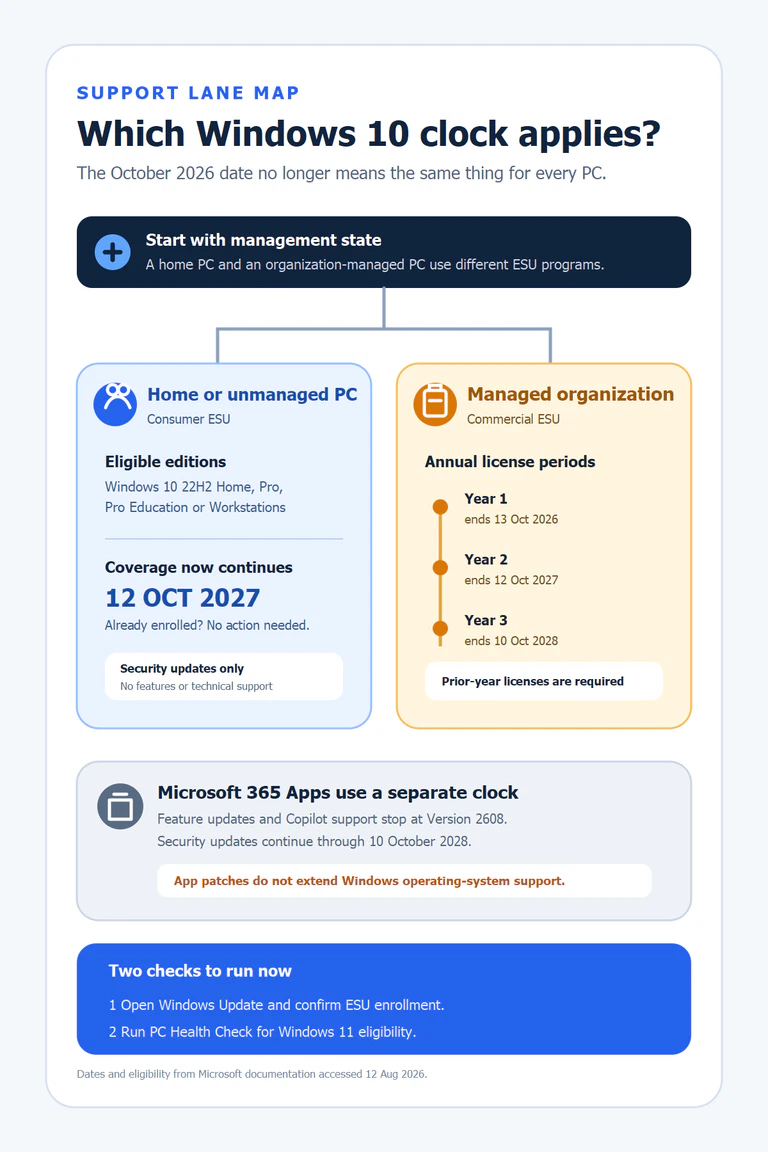
Find the support lane this PC actually uses
This verifier is the fastest way to avoid reading the right Microsoft date for the wrong device. Open the statement that describes the PC, then follow the action inside.
The PC is Home or Pro and is not managed by an organization
Check that it runs Windows 10 22H2, has the latest updates and shows ESU status in Settings → Update & Security → Windows Update. If it is already enrolled, Microsoft says coverage continues through October 12, 2027 without another enrollment step.
The PC is joined to a domain, Microsoft Entra or MDM
Consumer ESU is not offered while the device is used in these managed scenarios. The organization needs Commercial ESU or a migration plan. A device that is merely Microsoft Entra registered, rather than joined, can still qualify for Consumer ESU.
PC Health Check says the device is ready for Windows 11
Treat ESU as a short bridge while you verify backups, applications, drivers and any safeguard hold. Microsoft recommends waiting until Windows Update offers the upgrade for the device rather than forcing it past a known compatibility block.
The PC cannot run Windows 11 and has no valid ESU route
The installation is outside Microsoft’s supported security path. Back up the data, identify any application or peripheral that must move, and choose a supported replacement operating system or device before continuing routine online use.
Microsoft 365 Apps do not extend the operating system
Microsoft 365 Apps on Windows 10 receive feature updates and Copilot support, where eligible, until Version 2608 is released. The apps then remain on Version 2608 and receive security updates through October 10, 2028. OneDrive on Windows 10 22H2 follows the same security-update end date.
This distinction matters for people who see Word, Outlook or OneDrive updating and assume the whole PC remains covered. The operating system, the application suite and the device hardware each have their own support decision. Similar gaps between software entitlement and physical ownership also appear in our analysis of how corporations turn hardware ownership into a digital tax.
The three update promises are not interchangeable
| Track | Who it covers | Current endpoint | What it does not include |
|---|---|---|---|
| Consumer ESU | Eligible unmanaged Windows 10 22H2 PCs | October 12, 2027 | Features and technical support |
| Commercial ESU | Organization-managed Windows 10 PCs | Annual periods through October 10, 2028 | A one-time license covering all three years |
| Microsoft 365 Apps | Supported subscriptions running on Windows 10 | Security updates through October 10, 2028 | Windows OS support and full issue escalation |
Check hardware eligibility before buying more time
Windows 11 still requires a compatible 64-bit processor, TPM 2.0, UEFI firmware with Secure Boot capability, at least 4 GB of RAM and 64 GB of storage. CPU eligibility is usually the decisive non-upgradable constraint; memory and storage may be replaceable, while TPM or Secure Boot may simply need to be enabled in firmware.
Use Microsoft’s PC Health Check instead of guessing from the age of the machine. It explains why a PC is or is not eligible and flags safeguard holds that can delay an otherwise valid upgrade. A hold is a reason to wait for remediation, not permission to bypass the compatibility check.
If replacement is necessary, separate the data migration from the device-disposal decision. A functional computer can be repurposed with a supported operating system, transferred after secure erasure or sent through a responsible recovery route. Our pieces on urban mining and the physical costs hidden behind digital systems explain why the last step should not be an afterthought.
Use the extension as a migration window
The additional consumer coverage is valuable because it removes an artificial October 2026 panic for eligible home PCs. It is less valuable if it becomes another year without a backup, compatibility inventory or replacement budget. The practical decision can be made in three routes.
Choose this route for an eligible PC after verifying backups, essential applications and peripherals. ESU remains a safety margin while the migration is prepared.
Confirm enrollment, keep Windows Update current and set a replacement date before October 12, 2027. Do not mistake the bridge for a new long-term lifecycle.
Inventory the Year 1 estate, budget cumulative licensing where needed and retire exceptions. Coordinate identity work with the separate Microsoft Entra passkey migration plan rather than treating ESU as the entire security program.
The decision to make in August 2026
Home users who are already enrolled in Consumer ESU do not need to renew coverage in October 2026. They do need to verify the enrollment status on every PC, run PC Health Check and decide what replaces Windows 10 before October 12, 2027. Organizations should treat October 13, 2026 as the end of Commercial ESU Year 1 and confirm licensing for any device that must remain for Year 2.
That is the useful boundary. The updated consumer date buys time for a controlled migration. It does not add features, technical support or a permanent exception to Windows 11 hardware requirements.
Official sources checked on August 12, 2026
Microsoft support and lifecycle documentation
- Windows 10 Consumer Extended Security Updates — eligibility, enrollment options, automatic continuation and the October 12, 2027 endpoint.
- Extended Security Updates lifecycle FAQ — Commercial ESU annual dates and cumulative licensing.
- Windows 10 end of support and Microsoft 365 Apps — Version 2608, app security updates and support limitations.
- Windows 11 system requirements — processor, TPM 2.0, Secure Boot, memory, storage and eligibility checks.


