

Admin playbook · Microsoft Entra
What IT teams need to settle now
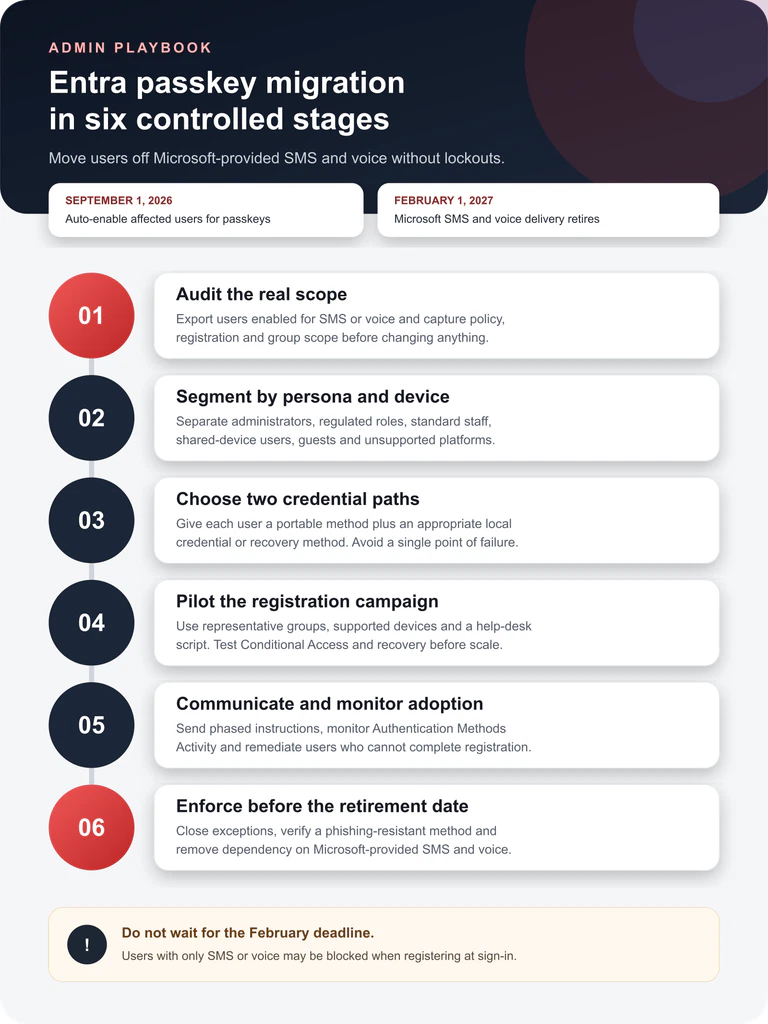
The September milestone changes policy scope and registration pressure. It is not the day Microsoft switches SMS off.
- September 1 starts the managed migration
Users in SMS or voice scope are automatically enabled for passkeys, and the registration campaign moves to Microsoft Managed. Microsoft-provided SMS and voice delivery retires on February 1, 2027.
- Inventory must come before enforcement
Export the affected users, groups, policies and registration state with Microsoft’s analyzer. A policy change made without that baseline can turn an authentication upgrade into a lockout campaign.
- One credential is not a migration plan
Give users an appropriate portable credential, a local or second method, a tested recovery route and a representative pilot before removing their dependency on SMS or voice.
Microsoft Entra administrators have two dates to manage. On September 1, 2026, users who are enabled for SMS or voice in the Authentication Methods Policy or legacy multifactor authentication settings will be automatically enabled for passkeys. The Registration Campaign policy will also be set to Microsoft Managed, so eligible users can be prompted to register a passkey after completing MFA.
On February 1, 2027, Microsoft-provided SMS and voice delivery retires. That later date is the hard operational deadline. The earlier date is when passive planning becomes an active tenant change. IT teams should use the intervening five months to identify affected users, select suitable credentials, run a controlled pilot and remove preventable recovery gaps.
This is not a generic introduction to passwordless authentication. It is a deployment checklist for Microsoft Entra ID tenants that still rely on SMS or voice. Passkeys use public-key credentials rather than shared secrets—the practical enterprise counterpart to the cryptographic foundations discussed in our analysis of digital and physical security.
What changes on September 1 and February 1
The two milestones solve different parts of the transition. September expands passkey eligibility and puts registration nudges under Microsoft management. February removes Microsoft’s telecom delivery service for SMS and voice. Treating September as the shutdown date causes unnecessary panic; treating February as the day to begin work creates lockout risk.
The two dates and the action behind each one
| Date | What changes | Administrator action |
|---|---|---|
| Before September 1, 2026 | Tenant remains under its current configuration. | Audit scope, define personas, validate Conditional Access and prepare support. |
| September 1, 2026 | Managed migration begins | Monitor registration nudges and remediate users who cannot complete passkey setup. |
| September 2026–January 2027 | A temporary policy opt-out remains available while migration is completed. | Use an exception only with an owner, reason, expiry date and measurable exit plan. |
| February 1, 2027 | Microsoft-provided SMS and voice delivery retires; there is no enforcement opt-out. | Verify every in-scope user has a working phishing-resistant method and recovery path. |
The first phase applies to the public cloud; Microsoft says other clouds will follow later. Self-service password reset is also affected because the same telecom methods can be part of a user’s recovery flow. A tenant that considers only interactive sign-in can therefore pass an MFA test while still failing a password-reset scenario.
Audit the users who are actually in scope
Do not estimate exposure from help-desk memory or a sample of user profiles. Microsoft provides an open-source SMS and Voice Usage Analyzer that reports the Registration Campaign state, SMS and voice policy scope, relevant groups and affected users. Its Get-SmsVoicePolicyUsers.ps1 script exports the data to CSV so the migration can be assigned and measured.
The analyzer requires the Microsoft Graph Authentication, Identity SignIns and Groups modules, the Policy.Read.All and Group.Read.All permissions, and at least an appropriate read or authentication policy role. Review the repository’s prerequisites before running it in a production tenant. The output should become a controlled working register, not an unmanaged spreadsheet sent around the organization.
- Record whether each user is directly included, inherited through a group or covered by legacy MFA settings.
- Separate SMS-only, voice-only and users who already have a phishing-resistant method.
- Identify administrators, regulated roles, shared-device staff, service accounts and external identities.
- Capture operating system, browser and device ownership where it affects passkey availability.
- Assign an owner and target completion date to every exception.
Choose credentials by persona rather than convenience
Microsoft’s deployment guidance distinguishes portable credentials from local credentials. Portable options include synced passkeys, a passkey in Microsoft Authenticator, FIDO2 security keys and smart cards. Local options include Windows Hello for Business, an Entra passkey on Windows and Platform SSO for macOS.
The correct combination depends on user risk, hardware and support reality. Administrators and highly regulated roles typically need tightly controlled credentials such as FIDO2 security keys. Standard users may be better served by synced passkeys. Device-bound methods provide an excellent daily experience but should not be the only route available when a laptop is lost, replaced or rebuilt.
Pilot the Registration Campaign with representative users
The Registration Campaign can target included users and groups while excluding others, but a tenant can campaign for either passkeys or Microsoft Authenticator at one time—not both simultaneously. Decide which registration objective has priority before turning a broad nudge into a mixed message.
Build a pilot group that represents the real estate of the organization: supported Windows and macOS devices, mobile users, remote workers, privileged administrators and at least one difficult edge case. Passkeys or FIDO2 must be enabled, and users need self-service access to security information registration. Conditional Access policies protecting security information registration can delay or prevent the nudge, so test that path explicitly.
- Confirm that the passkey method and self-service setup are enabled for the pilot.
- Test registration on every supported device-and-browser combination used by the group.
- Verify sign-in, step-up authentication, device replacement and recovery.
- Give the help desk a short decision tree and a known escalation route.
- Observe the pilot long enough to capture users who do not sign in every day.
Nudge behavior is evaluated by device and browser combination. A user who registered or deferred on one device may see different behavior elsewhere. Microsoft’s current documentation also notes gaps for Linux and B2B guests, so those populations require a separate plan rather than an assumption that the campaign will reach them.
Communicate the change as a task, not a campaign
Users need a concrete action, a deadline and a reason they can understand. “We are modernizing authentication” is not enough. Tell them which device to use, how long registration should take, what the prompt will look like, where to get help and what happens if they ignore it.
Use phased communications: an early notice, a task-focused instruction before the user enters the campaign, a reminder for non-completers and targeted help for exceptions. Match the message to the credential path. A FIDO2 key rollout needs physical distribution and inventory control; a synced passkey rollout needs device and account guidance; Windows Hello needs device readiness.
Choose an exception route with a defined exit
An exception should preserve business continuity while leading to a better end state. It should not silently convert a temporary dependency into permanent policy. Microsoft describes three practical routes for tenants that are not ready at the same time.
Use for supported users and devices. Audit, pilot, register, monitor and remove SMS or voice dependency before February 1.
Use between September and February only when a defined migration blocker remains. Record the owner, business reason, affected scope and expiry date.
Use only where a valid regulatory or operational requirement still demands SMS or voice and the organization accepts responsibility for the provider and controls.
The temporary opt-out delays the September behavior; it does not cancel the February retirement. Microsoft’s current instructions use a Graph policy setting for this window. Because the exact API and property can change, administrators should copy the request from the current official documentation at implementation time rather than from an old runbook.
A 30-day implementation checklist
What a small IT team can complete in four weeks
| Week | Deliverable | Exit criterion |
|---|---|---|
| 1 · Inventory | Analyzer export, policy map, affected-user register and exception owners. | Every in-scope account has a named persona and migration status. |
| 2 · Design | Credential matrix, Conditional Access review, recovery path and help-desk script. | Each persona has two viable methods and a tested recovery route. |
| 3 · Pilot | Representative campaign, device/browser tests and support observations. | Registration, sign-in and recovery succeed for every supported pilot path. |
| 4 · Scale | Phased communications, group rollout, adoption dashboard and exception review. | Non-completers and blockers are visible, owned and scheduled before enforcement. |
Failure modes that do not appear in a clean demo
The difficult users are often absent from the pilot unless the team deliberately includes them. Linux users are not currently nudged by the Registration Campaign for passkeys, and Microsoft’s documented platform matrix does not offer the same FIDO2 passkey path there. B2B guests are also not currently nudged for passkeys; Microsoft says broader support is planned, but a planned capability is not a present control.
Shared devices, frontline roles and users without an eligible smartphone can fail a rollout designed around personal hardware. Privileged administrators may require stronger custody and attestation than standard staff. Users who can sign in with a device-bound credential may still be unable to recover after device loss. Build these scenarios into the credential matrix rather than resolving them ticket by ticket after enforcement.
Monitor Authentication Methods Activity throughout the rollout. Registration completion alone is not proof of operational readiness. Look for actual use, method failures, support volume and the number of users who remain dependent on telecom delivery. The migration is complete only when the old method is no longer a hidden single point of failure.
The decision to make this week
The immediate task is not to disable SMS. It is to establish a trustworthy scope and assign a credential path to every affected persona. If the organization can produce that register this week, the September change becomes manageable. If it cannot, the tenant is already depending on an authentication method it does not fully understand.
Run the official analyzer, validate the results with identity owners and select a representative pilot group. Then move from registration to real sign-in and recovery tests. February 1, 2027 should be the final enforcement milestone—not the first day the help desk learns who still needs SMS.
Frequently asked questions
Will SMS and voice stop working on September 1, 2026?
No. September 1 starts the managed passkey migration for affected public-cloud users. Microsoft-provided SMS and voice delivery retires on February 1, 2027.
Can an administrator opt out of the September change?
Microsoft documents a temporary policy opt-out for the migration window. It does not remove the February 1 retirement, and the current Graph instructions should be taken from Microsoft Learn when the change is implemented.
Should every employee receive the same type of passkey?
No. Credential choice should reflect persona, device, risk and recovery needs. Administrators may require FIDO2 security keys, while standard users may be better served by synced passkeys and a suitable second method.
Does the Registration Campaign reach every user and platform?
No. Current Microsoft documentation identifies limitations for Linux and B2B guests, and nudge behavior depends on the device-and-browser combination. These users need a separate migration path.


