
Test brief · Tech
Check the colors behind the transparency
Use the exported file to verify what remains. A clean preview alone cannot answer the question.
- Invisible pixels can retain readable color dataOur PNG retained every original RGB byte after all alpha values were set to zero.
- Dropping alpha can reveal what was hiddenRemoving the channel recovered the original color pattern. Compositing the same input on white produced only white pixels.
- Partial transparency changes the resultAt alpha 128 out of 255, the rectangle remained visible after white compositing. A faint region still contributes color.
A transparent area can look empty while its file still contains the colors that used to be visible there. That matters when a designer hides part of an image, exports a PNG and sends it to someone else. The recipient receives the file, including whatever the export preserved.
We tested that distinction with a deliberately simple image: a red rectangle on a gray field. There was no private photograph, client name or hidden document. By controlling every input pixel, we could ask a precise question: did the original colors survive, even when the entire image had become transparent?
They did in our pipeline. More surprisingly, two operations that both remove the alpha channel gave opposite outcomes. One restored the original image. The other replaced every pixel with white.
One transparent input produced two opposite exports
A truecolor PNG with an alpha channel stores red, green and blue samples alongside an opacity sample. For the 8-bit samples used here, alpha zero means fully transparent and 255 means fully opaque. The W3C PNG specification says the stored color values are not multiplied by alpha. Setting that fourth value to zero therefore does not, by itself, require the three color values to become zero.
This is useful for image editing because appearance can change without destroying the original color samples. It also means that hiding pixels and replacing their colors are separate operations. Whether a particular editor preserves those colors during export is a further question; this test is not a survey of editor defaults.
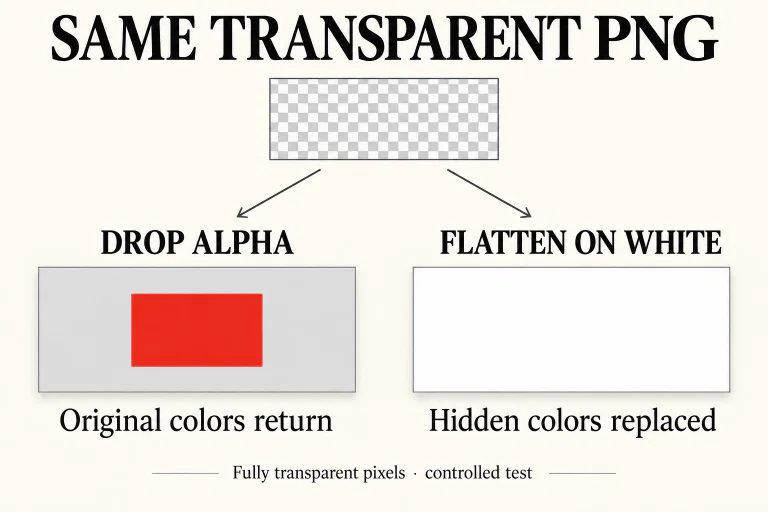
In Sharp, removeAlpha() drops the alpha channel. Our previously hidden red rectangle became visible, and the decoded RGB buffer matched the original byte for byte. The operation had removed the instruction that made those colors invisible.
By contrast, flatten() combines the image with a background before removing alpha. We explicitly chose white. Because every input pixel was fully transparent, every output pixel became white. The old red and gray values no longer appeared in the decoded RGB image.
The five outputs separate hiding from replacement
We ran the test on 15 September 2026 using Node.js 22.14.0, Sharp 0.35.4 and libvips 8.18.6. The source was 320 × 160 pixels. Its central 160 × 80 rectangle used RGB (208, 40, 56); the surrounding field used (240, 240, 240). The rectangle occupied x=80–239 and y=40–119, with coordinates starting at zero.
We saved the RGBA image as a static, full-color PNG, decoded it again and compared the stored samples. The fully transparent input reproduced the entire RGBA buffer exactly. The comparisons below inspect RGB without applying transparency; “retained” therefore describes file data, not what a normal preview displays.
What remained in the decoded pixels
| Output | Center RGB | Result |
|---|---|---|
| Alpha set to 0 | 208, 40, 56 | All original RGB retained; image fully transparent. |
| Alpha-0 input, then drop alpha | 208, 40, 56 | Original RGB recovered exactly; rectangle visible. |
| Alpha-0 input, then flatten on white | 255, 255, 255 | Every output pixel white. |
| Alpha-0 input, then explicitly zero RGB | 0, 0, 0 | Every stored color black; dropping alpha cannot restore the pattern. |
| Alpha set to 128, then flatten on white | 231, 147, 155 | Pink rectangle remains; surrounding field is 247, 247, 247. |
The zeroed-color control is important. A PNG file can contain fully transparent pixels whose original colors have already been replaced. In our control, all RGB values were deliberately set to zero. Ignoring its transparency showed uniform black, with no rectangle to recover. Transparency permits retention; it does not prove that a particular file contains a recoverable earlier image.
Inspect a copy before choosing an export operation
For a developer already using Sharp, the distinction is only one operation long. These examples use the same fully transparent test input and write separate files. The first is a diagnostic view of stored color. Keep that diagnostic local if the input could contain something sensitive.
await sharp('test-alpha-zero.png')
  .removeAlpha()
  .png()
  .toFile('inspect-rgb.png');
The second example creates an opaque image by compositing against an explicitly selected background. In our alpha-zero case, its decoded RGB data was uniformly white. Choose the background deliberately because it becomes part of the delivered image.
await sharp('test-alpha-zero.png')
  .flatten({ background: '#ffffff' })
  .png()
  .toFile('flattened-white.png');
Both snippets require a Sharp instance imported into an asynchronous JavaScript context. They are the operations used in the test, with descriptive output filenames. Neither command establishes that every field in an arbitrary file is safe to release. Our comparison concerns decoded pixel colors.
A half-transparent rectangle survives flattening
The simplest advice after seeing the first result would be to flatten every image before sharing it. Our fifth case shows where that advice stops working. We set alpha to 128 instead of zero and ran the same white-background operation. The center became (231, 147, 155), while the surrounding field became (247, 247, 247). The resulting rectangle was visibly pink.
This is especially relevant around soft masks and antialiased boundaries. The test does not measure any editor’s masking behavior, but it establishes the condition that matters: the fully transparent result depends on alpha actually being zero for the pixels in question. It cannot be inferred from an area merely looking faint against one background.
If a transparent background must remain part of the design, flattening the whole image also changes the deliverable. The alternative is a workflow that deliberately replaces the unwanted RGB values while preserving the intended transparency, followed by inspection of that exact export. Our zero-RGB control demonstrates the distinction without prescribing a universal button name across applications.
Verify the file that will actually leave the workstation
The useful release question is specific: after the final export, can the unwanted pattern still be seen when the stored colors are inspected without transparency? Apply the test to a copy of the final file, after the last conversion. A preview in the working document answers a different question.
Keep the boundaries separate. PNG can carry textual metadata; this experiment neither inserted nor audited it. It also did not test animated PNG, layered project files, social-platform recompression or recovery from backups. Packaging the output introduces another concern: an encrypted archive can still expose its filenames.
Other release checks still have their own jobs. A favicon’s accessibility and URL behavior determine whether a search system can fetch it. Network destination privacy concerns what a connection reveals. Neither check examines hidden RGB samples inside a delivered PNG.
For this file, the evidence was decisive: every original color survived making the image invisible, and every pixel became white only after the alpha-zero input was composited on white. A defensible handoff records which operation ran and what the exported pixels contained.
PNG standard and official image-processing documentation
- W3C PNG Third Edition — alpha representation defines the color/opacity relationship.
- Sharp — channel manipulation documents removing alpha and inspecting channels.
- Sharp — image operations documents compositing with a background.
- W3C PNG Third Edition — textual information identifies a separate file-information layer.


