

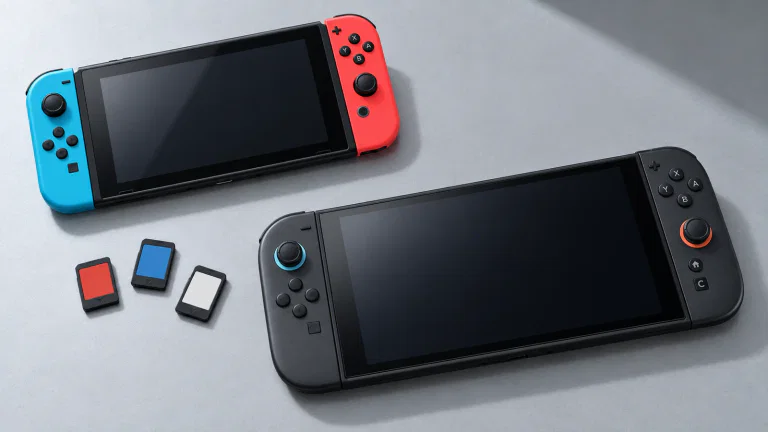
Access your old games and choose upgrades separately
An original Switch cartridge can be used for a compatible game on Switch 2. For digital purchases, Nintendo’s virtual game-card guide explains how to eject a purchased game from one console and load it on another. You do not need a second base copy merely because you changed consoles. Up to two consoles can be linked for virtual game cards; the initial linking brings them together with an internet connection. On the new console, open Virtual Game Cards and follow those linking/loading prompts.
Check the exact title on Nintendo’s game-compatibility page or its current eShop listing before retiring the original console. The page’s launch test summaries are dated June 5, 2025; Nintendo directs readers to individual game pages for the latest information. A copied launch list cannot tell you which problems have since been fixed. Nintendo Labo Toy-Con 04: VR Kit has a physical limitation: the larger console does not fit its VR goggles.
Playing the original game and getting a Switch 2 Edition are different options. Some titles receive free updates; others offer paid upgrade packs with their own improvements or extra content. Nintendo’s transfer guide describes both. Check the specific upgrade rather than assuming every old game gains the same resolution or frame rate. Your existing Nintendo Switch Online membership can also continue on Switch 2.
If you are comparing Switch 2 with a PC-based living-room setup, our Steam Machine guide covers its models, prices and buying process.
Choose the whole-system transfer before finishing setup
The whole-system transfer is offered during initial Switch 2 setup. If both consoles will be available, Nintendo recommends local communication between them. Uploading to Nintendo’s server is intended for situations such as trading in the original console before receiving the new one. That server upload resets the source console to factory settings. See Nintendo’s transfer-method guidance before starting.
Local transfer also has deletion rules. Nintendo’s detailed save-data explanation says cloud-supported saves belonging to users linked to a Nintendo Account are copied and remain on the source. Saves unsupported by cloud backup, and data for users without a linked account, are removed from the source after transfer. “Local” does not mean every save stays on both devices.
- Keeping both consoles: choose local communication during initial setup, after checking the save categories above. Tell other users of the original console first; the transfer includes their data too.
- Trading in the old console first: use the server route only when ready to reset it. Note the download deadline shown by Nintendo; the uploaded data is stored for up to one year.
- Already finished Switch 2 setup: do not reset it just to redownload games you own. Decide whether you need a whole-system transfer or only particular saves.
During a local system transfer, follow the new console’s setup prompts, then open System Settings → System → System Transfer to Nintendo Switch 2 on the original Switch. Both consoles need an internet connection. Digital software can be downloaded after setup, so allow time for the games themselves to arrive. Nintendo’s full instructions cover the on-screen steps.
Move individual saves after setup without treating them as backups
A fresh download of a game and its saved progress are separate things. If the new console is already set up, Nintendo also provides individual save transfers and, for supported software with Nintendo Switch Online, cloud-backup downloads. Check the game’s support before choosing a route, especially for titles with their own save-transfer arrangements.
For a nearby-console save transfer, link the same Nintendo Account to the relevant user on both consoles. Open System Settings → Data Management → Transfer Your Save Data: send from the old console and receive on the new one. This moves the selected save; it deletes that file from the source rather than creating a second copy. Overwriting an existing target save also destroys that target file.
Decide which console should hold your current progress before sending anything. If you have already started playing on Switch 2, inspect that save before accepting an overwrite.
Keep original Joy-Con when a game needs their physical features
Original Joy-Con can connect wirelessly to Switch 2, but they cannot attach to it or charge from its sides. Keep the original console or an appropriate original Joy-Con charging accessory. The original Switch Pro Controller also works wirelessly and can charge by USB through the new dock. Nintendo’s accessory matrix gives the supported combinations.
That can matter more than buying another controller. Ring Fit Adventure needs original Joy-Con for its Ring-Con and leg strap. Some 1-2-Switch minigames need the original right Joy-Con’s IR Motion Camera, which Joy-Con 2 lacks. Switch Sports needs an original Joy-Con for the leg-strap Soccer Shoot-Out mode. Nintendo details these game-specific controller requirements.
Original controllers also cannot wake Switch 2 with their HOME button, and games requiring Joy-Con 2 features such as mouse controls need the appropriate new controller. Those are functional limits of the supported controller setup, rather than a reason to discard every older controller.
Budget for the dock and storage you will actually use
- Dock: the original Switch dock is incompatible with Switch 2.
- Power: the original AC adapter can charge Switch 2 directly, but cannot power its TV mode. These two limits appear in Nintendo’s hardware table.
- Game storage: expanded storage requires microSD Express. An ordinary microSD card from the old Switch cannot become game storage on the new console; it can be used to view or import original Switch screenshots and videos. Nintendo explains the distinction in its memory-card guidance.
Make the handover game by game: decide where your current progress belongs, retain original controllers for titles that need them, then check the television and storage setup. That is the useful inventory to make before selling the old equipment as one bundle.


