

HTML implementation · SEO
The off state must survive into the HTML
Check the delivered attribute and its ancestors before trusting a CMS toggle.
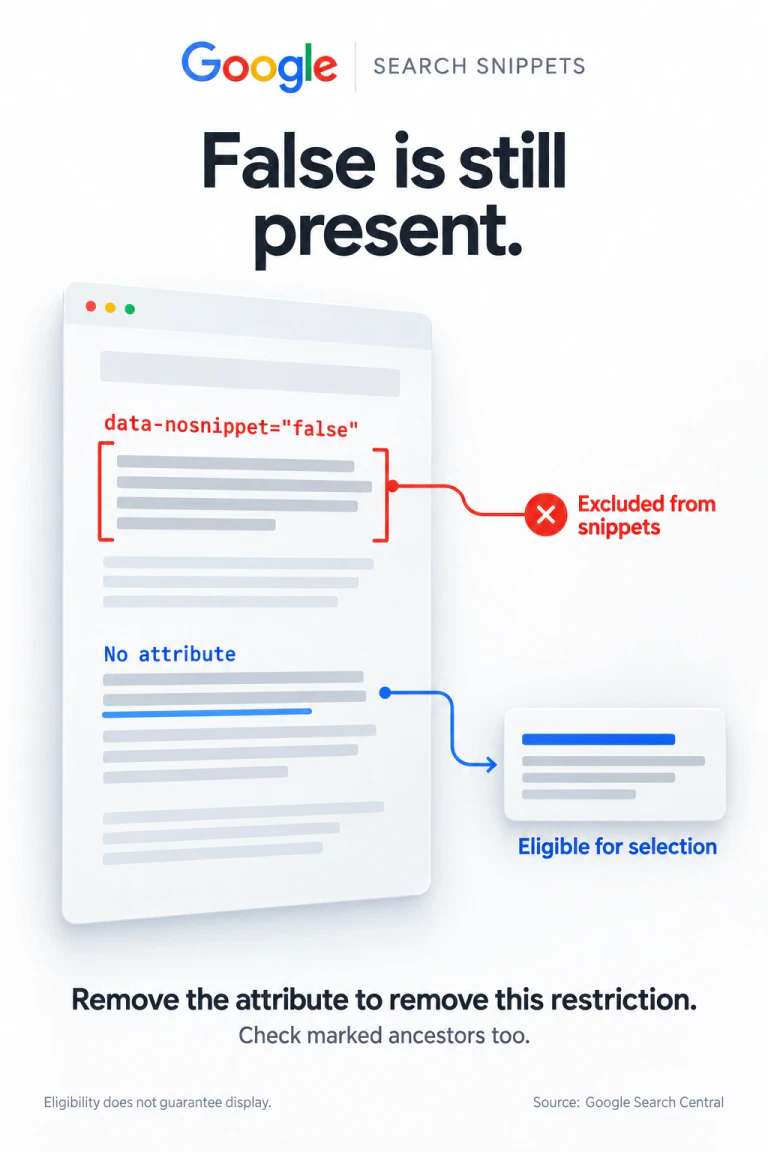
- The word false does not switch off this restrictionGoogle uses the presence of data-nosnippet on supported elements; its value does not reverse the instruction.
- Absence must hold at the right scopeA passage without its own attribute can still sit inside a marked wrapper. Inspect the ancestor that contains it.
- A clean DOM is implementation evidenceIt does not prove when Google will recrawl the page or which snippet it will choose.
Imagine an editor switching off “Exclude this passage from search previews.” The content looks unchanged, the setting is saved, and the template serializes the option as data-nosnippet="false". The interface says off. The HTML still carries the exclusion instruction.
This is a hypothetical implementation failure, not a measured defect in a particular CMS. It is easy to reproduce at the DOM level, and it gives developers a better acceptance criterion than a screenshot of a toggle: the correct attribute must be absent from the correct scope in the document that is actually delivered.
The value is a string, while Google checks presence
Google’s data-nosnippet specification explicitly treats the attribute as boolean and ignores its value. Supported elements are span, div and section. On one of those elements, writing "false" does not cancel it.
<span data-nosnippet="false">Sample passage</span>

<span>Sample passage</span>
The first line carries the attribute. The second does not. Neither line hides the passage from a person reading the page. The difference concerns selection of that text for a search snippet.
There are two systems to keep separate. The browser exposes custom data-* attributes as strings through the dataset API. Google gives this particular attribute a presence-based meaning. It would be a mistake to conclude that every custom data attribute has Google’s boolean semantics.
Nine local cases expose the serialization trap
We ran an isolated Chrome DOM experiment on 12 September 2026. It created fresh span elements, applied each operation and read hasAttribute(), getAttribute() and the serialized HTML. No page was submitted to Google. Eight cases test the attribute itself; a ninth tests a remaining ancestor restriction.
Observed in local Chrome · eight direct cases
A string value is different from no attribute
| Operation | Attribute | Read value |
|---|---|---|
| No assignment | Absent | null |
| Set empty string | Present | "" |
| Set "true" | Present | "true" |
| Set "false" | Present | "false" |
| dataset = false | Present | "false" |
| dataset = null | Present | "null" |
| removeAttribute() | Absent | null |
| delete dataset key | Absent | null |
The two misleading assignments are not equivalent to deletion. JavaScript false becomes the string "false"; JavaScript null becomes "null". MDN documents this conversion. Its removeAttribute documentation identifies removal as a separate operation.
Reproduce the difference without changing a live page
This small browser-console example creates a detached element. It does not modify the page’s content or contact a search service. The logged states reproduce the central contrast in the table.
const sample = document.createElement("span");
const state = () => ({
  present: sample.hasAttribute("data-nosnippet"),
  value: sample.getAttribute("data-nosnippet")
});

sample.dataset.nosnippet = false;
console.log(state()); // true, "false"
sample.dataset.nosnippet = null;
console.log(state()); // true, "null"
sample.removeAttribute("data-nosnippet");
console.log(state()); // false, null
The removal demonstrates the API operation. It is not a recommendation to ship a client-side cleanup that repairs the restriction after load. A correct final DOM can arrive too late to settle how a crawler interpreted the initial response.
The ninth case lives above the passage
Now put an unmarked child inside a marked wrapper. Removing the child’s own attribute cannot remove the surrounding instruction. In our ninth fixture, the child reported no attribute while its ancestor still matched the marked-wrapper selector.
<div data-nosnippet>
  <span>Sample passage</span>
</div>
To diagnose the scope, select the passage element in DevTools and inspect its nearest supported marked container:
$0.closest(
  "span[data-nosnippet]," +
  "div[data-nosnippet]," +
  "section[data-nosnippet]"
)
Here $0 means the element currently selected in Chrome DevTools. The expression is read-only. A returned element identifies a possible covering instruction; null means that this selector found none. This check covers ordinary DOM ancestry, not every possible frame or shadow-tree boundary.
Make the initial response agree with the intended state
Google says extraction can occur before or after rendering and advises against adding or removing this attribute on existing nodes through JavaScript. Newly inserted elements should carry the intended setting when they enter the DOM. That makes this a template contract, not merely a late visual state.
Define the output condition directly: when the passage should be excluded, emit the attribute on the supported wrapper; otherwise omit it. Verify the rendered HTML produced by the actual framework and version. A typed boolean in application state does not establish what the server or component serializer ultimately emits.
- Capture the initial response. Inspect the document response and the intended passage, including the surrounding wrappers. Record the exact attribute presence.
- Compare the rendered DOM. After application code runs, check the same passage and its ancestors. A mismatch points to a rendering or hydration step that changes the policy.
- Test both settings and nesting. Cover exclusion on, exclusion off, false/null serialization and a child inside an excluded container. Assert the output markup, not only component state.
- Check the processing prerequisites. The page and its instructions must be accessible to the crawler. Then evaluate Search behavior separately after Google has processed the changed page.
Access problems belong to a different diagnostic: a robots.txt response can change what Google is allowed to crawl. Likewise, a small compressed transfer does not prove the relevant HTML fits within the processed document. Neither problem is solved by changing the value of a passage attribute.
Eligibility leaves Google a choice
Google’s snippet guidance says snippets vary with the query and are primarily assembled from page content; a meta description may sometimes provide a better summary. Removing this restriction creates no obligation to display the restored passage.
A useful release report therefore separates two observations: “the initial and rendered HTML satisfy the intended attribute contract” and “Google showed this snippet for this query on this date.” The second observation is specific to an output and time. It is not a substitute for the first.
This control also does not make text private. It is still delivered to visitors, and Google documents that structured data within a marked element remains usable for search results. For decisions about broader reuse or removal from Search, start with the distinct Google publishing controls rather than stretching this passage-level setting beyond its purpose.
Questions about the false value
Can I write data-nosnippet="0" instead?
Changing the string does not provide an off state. For supported elements, Google ignores the value. Check absence and any covering marked ancestor.
Will setting style or hidden remove the instruction?
That changes a different aspect of the element. Inspect the actual attribute and intended page behavior; do not use visual appearance as proof that a snippet restriction disappeared.
Did the experiment test Googlebot?
No. It tested Chrome DOM serialization and ancestry locally. Google’s interpretation is supported by its published specification, not inferred from our browser results.
Documentation and experiment scope
Google documentation, browser APIs and local observations
- Google rendering guidance for data-nosnippet
- MDN HTMLElement.dataset
- MDN Element.removeAttribute
- Google Control your snippets in search results
- Google More options to help websites preview their content
Sources checked 12 September 2026. Nine local Chrome cases passed. The local test measured attribute presence, string values, serialized HTML and ancestor coverage; it did not measure crawling, indexing, rankings or traffic.


