

SEO · robots.txt and HTTP status
A blocked instruction file can lose its instructions
Diagnose the response before rewriting the rules.
- Name the resourceA forbidden robots.txt and a forbidden page are different failures.
- Check what was fetchedThe file at your origin is not necessarily the response Google received.
- Keep protection separateCrawl instructions cannot replace authentication for private content.
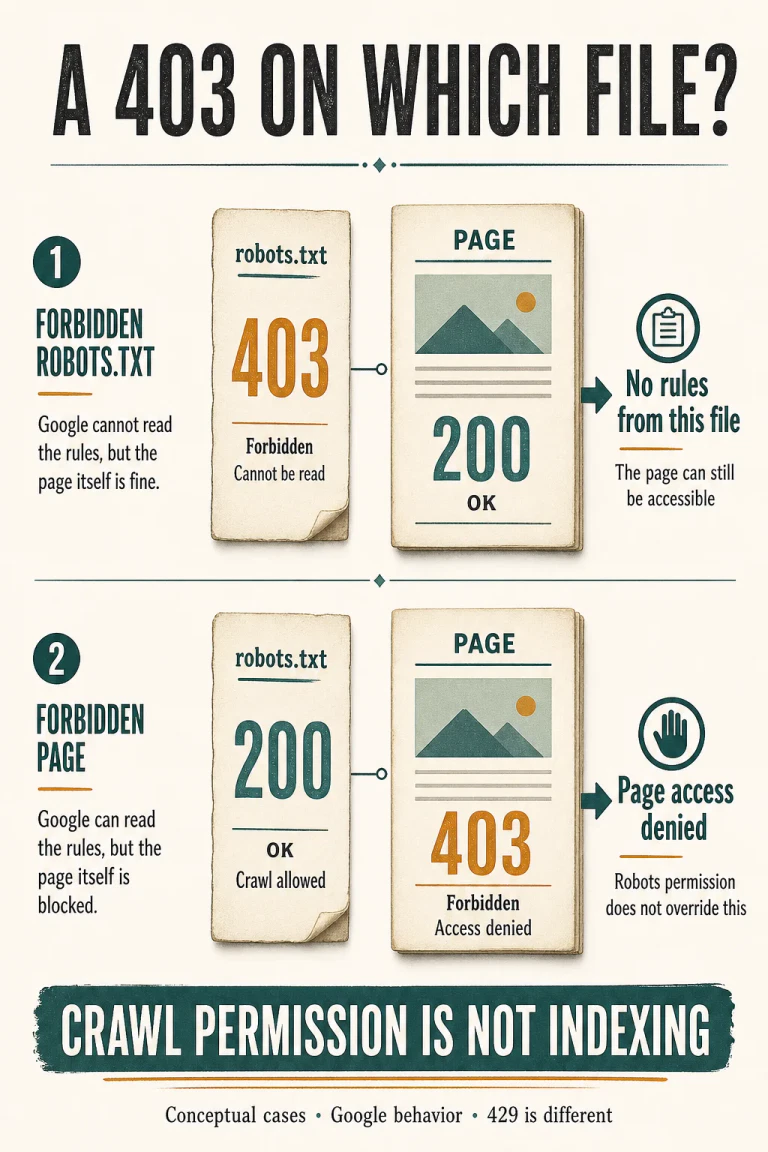
If Google receives HTTP 403 for robots.txt, it treats the file as absent and assumes no crawl restrictions from it. That is the documented behavior for ordinary 4xx responses, with 429 explicitly excepted, in Google’s robots.txt specification, updated 31 August 2026. “Forbidden” describes the request for the instruction file; it does not create a site-wide Disallow.
Imagine a public catalogue whose team excludes internal search results from crawling. The intended file still contains the right rule. A new edge-security configuration then refuses requests to robots.txt while ordinary catalogue URLs continue returning content. An editor opens the file in the repository, sees the exclusion and concludes that nothing relevant changed. The missing evidence is the response delivered outside that repository.
Put the 403 beside the URL that returned it
This is a synthetic configuration example, not an observed site incident. Assume one host and an uncomplicated wildcard rule, with no more-specific crawler group or competing Allow. RFC 9309’s access-result rules distinguish a successfully obtained instruction file from an unavailable one. That distinction is more useful here than the severity suggested by an error label.
- robots.txt returns 200; the catalogue page returns 200. The file contains a valid matching
Disallow: /catalog-search/rule. The public page can work for visitors while crawling that path is disallowed. - robots.txt returns 403; the catalogue page returns 200. This is the important failure. The intended rule at the origin does not establish a restriction in the response Google processes.
- robots.txt returns 200 and allows crawling; the page returns 403. The page itself refuses access. Permission under the robots protocol cannot turn that content response into a successful one.
Google described this contrast in its February 2023 warning about using 403s and 404s for rate limiting. A client error on content affects that content; the same class of error on robots.txt makes the control file treated as nonexistent. This is an established behavior, not a newly announced loophole.
A server error introduces a different history
Do not replace that conclusion with “every failed robots request allows crawling.” In the Crawl Stats documentation, Google describes an initial 12-hour crawl pause after robots availability failures, followed by use of the last good cached version when available. With no cached version in that subsequent phase, it assumes no restrictions. Longer failures introduce further checks on the site’s general availability. A 503 therefore requires its own diagnosis; it is not a permanent substitute for a working exclusion file.
Ordinary caching matters too. Google generally caches robots.txt for up to 24 hours, with exceptions and adjustments. A successful check from your laptop now does not establish what Google had available earlier. Keep “current response,” “Google’s last fetch” and “subsequent content requests” as separate observations.
Collect a response pair before editing the firewall
The useful first task is read-only. Choose one representative public URL that the intended rule excludes, not a confidential customer record. Record enough context that a developer can reproduce your observation without guessing which host, deployment or request you meant.
- Name the exact authority. Record scheme, host and port. Robots scope is specific to these values; a successful check on the bare domain does not settle what happened on a subdomain.
- Keep both responses. Record timestamp, requested URL, final URL after any redirects, HTTP status and response body for robots.txt; separately record the representative page’s result. A screenshot saying “access denied” leaves the resource and status ambiguous.
- Use the relevant request method. Google retrieves HTTP robots files with a non-conditional GET. A HEAD-only check omits the returned rules and does not reproduce that documented method.
- Trace the response owner. Ask whether the edge, origin, application or another intermediary generated it. Preserve a relevant request identifier if available. Do not disable unrelated security controls merely to see whether the symptom disappears.
Our server-log analysis guide provides broader context for reading request evidence. For this investigation, start narrowly: isolate the robots request, then inspect the content requests separately. A site-wide count of 403 responses merges the two cases the article is trying to distinguish.
Compare your observation with Google’s fetched version
The Search Console robots.txt report shows the file’s host, fetch status and last fetched version. Its Versions history covers the previous 30 days, but an entry is created when the file or fetch result differs from the previous fetch. It is a change history, not an exhaustive request log. A “Fetched” result also warrants checking the file’s parsing errors.
Compare that evidence with the timestamp of the configuration change and your saved response pair. If the observations disagree, preserve the disagreement. A browser result is evidence about that browser request, not proof that Google received the same body at the same time.
After a critical correction, the report offers a robots recrawl request. That is a follow-up to a verified fix, not a substitute for identifying the failed response. Do not report success merely because the request was submitted.
A useful handoff: “At this timestamp, HTTPS on this host returned 403 for robots.txt while the selected public result URL returned 200. The intended file excludes that path. Here are the response bodies and Google’s last recorded version.” This tells the next person what is known and what still needs checking.
Keep private access and search inclusion out of the same bucket
RFC 9309 explicitly rejects robots.txt as a security measure. Listing a path can itself reveal that the path exists; private resources need appropriate access control, such as authentication. Nothing in the 403 behavior lets Google bypass that protection.
Google’s technical requirements also separate crawling from index inclusion. A robots-blocked URL may still appear in search; a noindex instruction needs crawl access to be processed. Conversely, permission to crawl a working page does not guarantee indexing. Decide which outcome you need before choosing a control.
This is also separate from what Google-Extended controls or why a page is classified as a soft 404. First establish which resource answered the request. Only then interpret the rule or content behind it.
Questions about robots.txt returning 403
Does this prove Google crawled an excluded URL?
No. It establishes a documented permission outcome, not an observed request. Check request evidence before claiming that crawling occurred.
Should I remove authentication to make robots.txt work?
Do not remove protection from private content. Diagnose the rules-file response separately and preserve appropriate resource-level access controls.
Primary sources
Six primary sources checked 8 September 2026
- Google robots.txt specification — updated 31 August 2026
- RFC 9309 — September 2022
- Google rate-limiting warning — 17 February 2023
- Search Console robots.txt report
- Search Console Crawl Stats report
- Google Search technical requirements
Documentation analysis and a synthetic configuration example. No live firewall, private resource or Googlebot experiment was used.


