

Reproducible experiment · technical SEO
A small download can contain too much HTML
The useful question is not only how much crossed the network. It is how much expanded, and where the answer sits inside it.
- Count decoded HTML, not just transferred bytesGooglebot’s documented size limit applies to uncompressed data. A tiny gzip payload can expand into an oversized document.
- Measure where the answer endsTwo equally large documents can place their essential content on opposite sides of a fixed byte boundary.
- Treat the example as a diagnostic, not an indexing predictionThe test below models body bytes. It does not reproduce Googlebot, rendering or ranking.
A deployment shrinks the HTML download to a few kilobytes. The compression check is green. Yet the document still contains more than two million bytes after decompression, and its main answer starts near the end. The performance improvement is real; the conclusion that everything now fits a crawler’s fetch limit is not.
We built a small counterexample: two HTML documents with exactly the same decoded length and, in our test, exactly the same gzip length. Only the placement of a large comment changed. One document put the complete answer inside the first two million bytes. The other did not. You can reproduce it without a website, a search account or a paid crawler.
The current limit is a decoded, per-file constraint
Google’s current Googlebot documentation states a 2 MB limit for supported files, with a 64 MB exception for PDFs. The file-size rule applies to uncompressed data. Separately referenced CSS and JavaScript are fetched separately, with their own applicable limits. These are not the same thing as the combined transfer weight displayed for an entire browser page load.
The March 2026 Inside Googlebot explanation adds an important boundary: reaching the limit does not automatically discard the whole page. The downloaded portion can still be forwarded for indexing consideration. It also describes header bytes counting toward the limit and warns that large inline material can push important content outside the downloaded portion.
That is enough to separate two engineering tasks. Compression reduces the encoded payload. Reducing the document changes the amount of decoded material. A compressor can do the first brilliantly without doing the second at all.
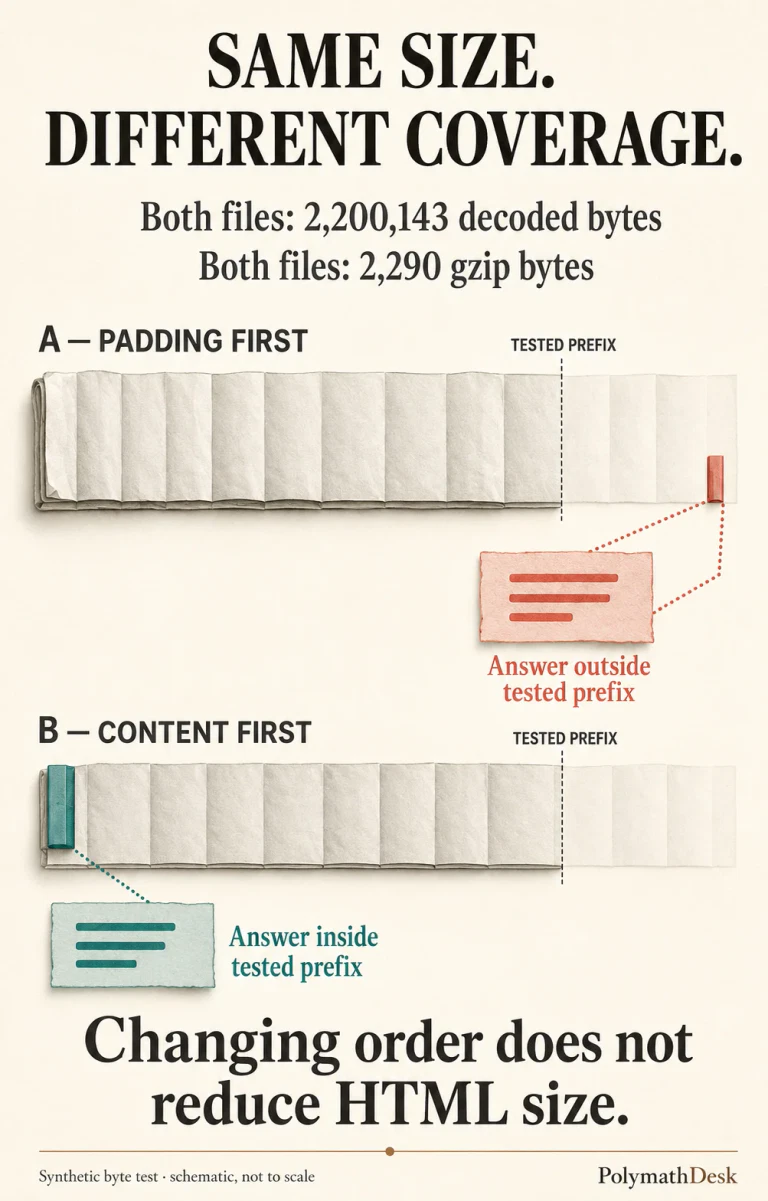
Same HTML size. Same gzip size. Different answer coverage.
Our synthetic document has a short head, a main element containing an answer, and an HTML comment holding 2,200,000 repeated ASCII characters. The comment is deliberately extreme and highly compressible. It is test padding, not a claim about the typical size or compression ratio of a real site.
Version A places that comment before the main element. Version B places it after. Both were measured as UTF-8 buffers, using Node.js v24.19.0 and gzip level 9. Our run produced:
- Padding first: 2,200,143 decoded bytes; 2,290 gzip bytes; the
<main>element starts at zero-based byte offset 2,200,071. The complete main element is absent from both tested prefixes. - Content first: 2,200,143 decoded bytes; 2,290 gzip bytes; the main element starts at byte offset 64. The complete main element is present in both tested prefixes.
- Padding removed: 136 decoded bytes; 128 gzip bytes. This control removes the oversized body rather than merely moving its answer.
The tested prefixes are 2,000,000 and 2,097,152 bytes. Checking both avoids making the result depend on whether a reader interprets “MB” using decimal or binary units. This is not an assertion about Google’s exact internal cutoff. Header overhead is excluded, and the answer sits far from either boundary.
The useful observation is the collision between two identical headline measurements and two different content positions. If a dashboard retains only decoded size and gzip size, it cannot distinguish these documents. Neither number records where the answer begins or whether the whole answer is inside a given prefix.
Run the byte test yourself
Save the following as byte-test.cjs and run node byte-test.cjs. It makes no network requests and uses only Node’s built-in modules. Gzip byte counts can vary with runtime or compression implementation; the decoded lengths and prefix results are the central checks.
Open the reproducible Node.js test
const { gzipSync } = require('node:zlib');
const head = '<!doctype html><html><head>' +
  '<title>Byte test</title></head><body>';
const main = '<main><h1>ARTICLE_START</h1>' +
  '<p>Required answer.</p></main>';
const pad = '<!--' + 'x'.repeat(2200000) + '-->';
const end = '</body></html>';
const variants = {
  paddingFirst: head + pad + main + end,
  contentFirst: head + main + pad + end,
  paddingRemoved: head + main + end
};
for (const [name, html] of Object.entries(variants)) {
  const raw = Buffer.from(html, 'utf8');
  console.log(name, {
    decoded: raw.length,
    gzip: gzipSync(raw, { level: 9 }).length,
    mainStart: raw.indexOf('<main>'),
    completeMainInPrefix: [2000000, 2097152].map(
      n => raw.subarray(0, n).includes(Buffer.from(main))
    )
  });
}
This is a byte-presence test, not a browser rendering test. It does not parse an incomplete comment, execute scripts, apply CSS or ask Google to index anything. A real truncated document may have parsing and dependency failures that this simple model cannot represent.
Why moving the answer is not the complete fix
Moving the comment changes the main-content offset, but leaves the document oversized. It demonstrates why order matters; it does not establish that shipping Version B is a sound production decision. The padding-removed control is the cleaner fix in this example because the padding has no purpose.
Real inline content may have a purpose. Before deleting it, identify whether it is unused CSS, duplicated state, required initialization data or something else. Removing required data can break the page. Moving a script can change execution order. A byte-saving change deserves a functional check, not only a smaller-file badge.
Google’s per-URL explanation distinguishes embedded material from resources fetched through their own URLs. Moving suitable inline material into a separate resource can therefore change the main document’s byte count. It does not make that resource free, guarantee successful rendering or remove its own fetch constraints. This is an architectural choice, not a trick that increases Googlebot’s limit.
Also distinguish “the title is present” from “the answer is present.” A diagnostic that checks only an early heading can pass while the paragraph that explains the result remains outside the prefix. For a release check, record the byte position after the complete critical section, not just the location of its opening marker.
Inspect the document, not the whole-page transfer total
In Chrome DevTools, Big request rows exposes the uncompressed resource size in the lower value of the Size column. Start with the main document request. The totals at the bottom summarize logged requests and answer a broader question. Do not use a total containing images, fonts and scripts as the main HTML size.
- Choose the response you are testing. Record the URL, template, deployment version, response status and request conditions. A cached, logged-in or differently negotiated variant may not represent the document you meant to inspect.
- Measure the decoded body. Keep transfer size as a separate performance metric. Count bytes, not JavaScript string characters: UTF-8 characters can occupy more than one byte.
- Locate a complete critical section. Record its start and end offsets in the decoded response. Choose a stable, unique marker or parse the section deliberately; a random matching phrase is not a reliable boundary.
- Find what precedes it. Account for large inline styles, serialized state, comments and repeated markup. Identify the largest removable or separable contributors before changing the template.
- Verify the change in both dimensions. Check decoded size and content placement, then confirm that the page still works. Leave margin for headers and future template growth instead of treating the published maximum as a target.
If the request returns a 304 with no new body, you are investigating a different response path first. Our stale-validator test explains why a successful revisit can still leave a correction undelivered. Establish which representation was received before measuring its contents.
Likewise, if you move an asset to another URL, check the new dependency rather than declaring victory from the smaller HTML alone. The favicon migration checklist addresses that separate declaration-and-resource problem.
Report a reproducible defect, not an invented ranking loss
An actionable issue report for this experiment would say:
The decoded fixture is 2,200,143 bytes. Its main element starts at byte 2,200,071, beyond both tested body prefixes, despite a gzip size of 2,290 bytes. Removing the test padding reduces the decoded body to 136 bytes. Googlebot behavior and search impact were not measured.
That report gives someone a defect they can reproduce and a change they can verify. “Google is ignoring our article because it is too large” would go further than the evidence. Indexing depends on more than fetching, and a low-traffic page is not proof of truncation.
Keep that boundary when checking outcomes in analytics too: Search Console totals and query rows can describe different disclosed populations. A convincing technical diagnosis starts with the response bytes. A traffic claim needs its own evidence.
Questions about Googlebot size and compression
Will Brotli solve the same decoded-size problem?
Changing the compression format does not remove bytes from the decoded HTML when the content is unchanged. Compression and document reduction solve different problems.
Does a page over the limit automatically disappear from Search?
No. Google says the downloaded portion can still be considered for indexing. Whether useful content is present, parses correctly and can be rendered is a separate question; this experiment does not predict an indexing outcome.
Do all images and scripts share the main HTML allowance?
No. Google documents separate fetching for referenced resources. Inline material is part of the document that contains it. Different crawler or resource types can have different limits.
Should every website urgently redesign around this limit?
No. Measure representative decoded documents first. A site whose complete HTML sits comfortably below the documented limit has not established this particular problem merely because its total page load is large.
Documentation and experiment provenance
Primary documentation checked 7 September 2026
- Googlebot — crawl size limitations
- Inside Googlebot — 31 March 2026
- Chrome DevTools — Network features reference
- PolymathDesk offline experiment: Node.js v24.19.0, gzip level 9, UTF-8 body buffers; both gzip round trips and both prefix tests verified. No network request or live Googlebot measurement.


