
🛡️ Key takeaways on domain remediation
Cleaning a Zombie Domain is not just about deleting files; it's about technically convincing Google that the entity has changed. Here are the 3 critical phases of recovery:
-
1. The cloaking bifurcation
The hack persists because it remains invisible to admins. By targeting the
HTTP_USER_AGENT, attackers serve normal content to you but serve thousands of spam pages to Googlebot. Detection requires analyzing server logs for size discrepancies in crawler responses, not just visually browsing the site. - 2. The "Death Sitemap" protocol Waiting for Google to naturally de-index millions of spam pages takes too long. You must aggressively force the issue. By generating a temporary XML sitemap containing only the spam URLs and submitting it to Search Console, you force the crawler to visit them immediately, hit your 410 headers, and drop them from the index.
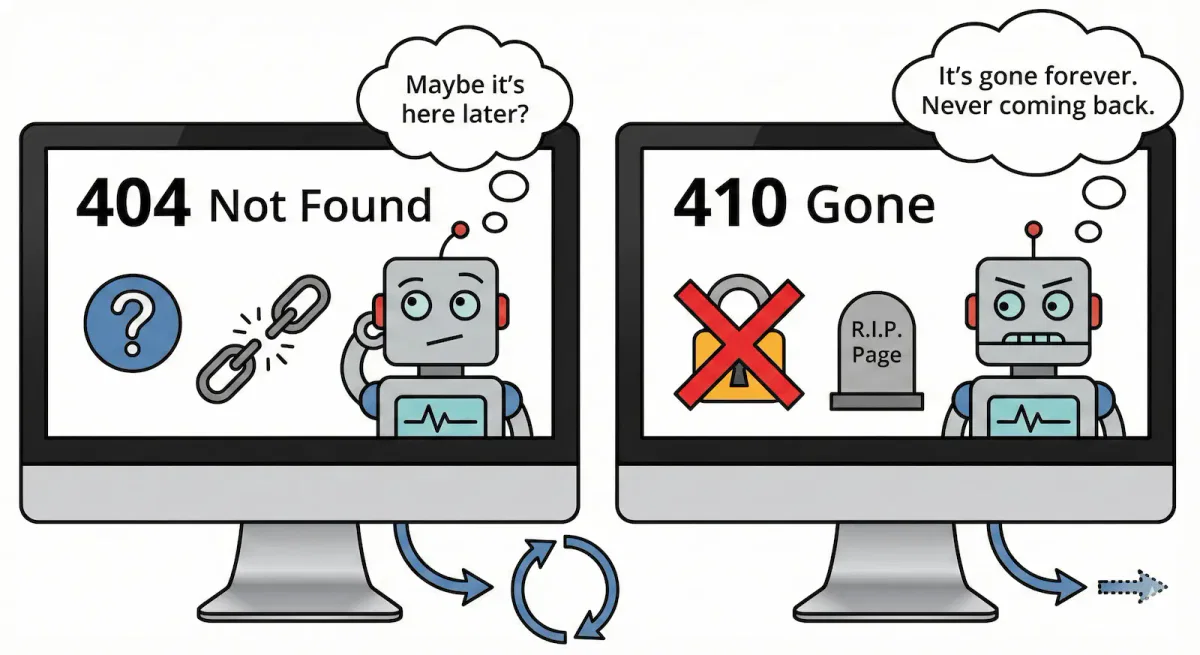
- 3. 410 Gone vs. 404 Not Found In a massive infection, the status code matters. A 404 implies the page is "missing" and might return; a 410 implies "permanently deleted." Configuring your server to return 410 Gone for Japanese character patterns accelerates the index purge and signals to algorithms that the semantic identity of the domain is being sanitized.
The digital economy is littered with the remnants of abandoned web properties, often referred to in the cybersecurity sector as zombie domains. These are domain names that have expired, been dropped by their original registrants, and subsequently re-registered or hijacked by malicious actors. The primary objective of these actors is to exploit the residual trust, authority, and backlink equity previously accrued by the legitimate domain. By repurposing these assets, attackers inject spam content, ranging from counterfeit merchandise to illicit pharmaceuticals, into the search index. This practice fundamentally alters the semantic identity of the web property.
This report provides an exhaustive technical analysis of the lifecycle of a Zombie Domain, with a specific focus on the Japanese Keyword Hack (JKH). This prevalent form of SEO poisoning creates millions of spam pages containing auto-generated Japanese text, monetized through affiliate links. The analysis extends beyond mere cleanup; it addresses the complex challenge of "Entity Reconciliation" within Google's Knowledge Graph. When a domain changes hands, the semantic web often retains the memory of the previous entity. Dissociating a new legitimate business from a compromised or reputationally damaged predecessor requires precise manipulation of structured data, strategic signaling to search algorithms, and rigorous server-side hardening.
Furthermore, we examine the implications of these compromises in the era of Large Language Models (LLMs). As crawlers like GPTBot and CCBot ingest web content to train generative AI, the presence of spam on Zombie Domains introduces "data poisoning." This report details the protocols for blocking these agents and cleansing the digital footprint to ensure that the domain does not contribute to the degradation of AI training sets.
Anatomy of the Japanese Keyword Hack (JKH)
The Japanese Keyword Hack is a distinct classification of SEO spam where attackers gain unauthorized access to a web server, typically via vulnerabilities in Content Management Systems (CMS) like WordPress, and inject scripts that generate thousands of pages targeting Japanese search terms. These terms usually relate to "replica brands" or "fake merchandise."
The infection vector and cloaking mechanisms
The sophistication of JKH lies in its ability to remain undetected by the site administrator while serving malicious content to search engine crawlers. This technique, known as "cloaking," relies on server-side logic that differentiates requests based on the User-Agent string or IP address.
When a human user or the site administrator navigates to the homepage, the server returns the expected content. However, when a crawler such as Googlebot or Bingbot requests the site, the malicious scripts intercept the request and serve a page filled with Japanese characters and affiliate links. This bifurcation ensures that the hack can persist for weeks or months, allowing the spam pages to be indexed deeply before the site owner receives a manual action notification or observes a collapse in organic traffic.
The technical implementation often involves modifying the .htaccess file on Apache servers or injecting PHP code into core CMS files such as header.php or index.php. The injected code typically checks the HTTP_USER_AGENT header. If the string matches a known bot, the script dynamically generates HTML content populated with keywords retrieved from a remote command-and-control (C2) server or a local hidden database file.
File system compromise and directory structure
Forensic examination of infected servers reveals a predictable pattern of file system modification. Attackers frequently create random directory names located in the root directory or within public-facing folders like /wp-content/uploads/. Examples include directories such as /ltjmnjp/ or /341/. Inside these directories, one might find scripts that act as door generators.
In many instances, the attackers do not create static HTML files for every spam page. Instead, they use a single PHP script and RewriteRules to map thousands of URL patterns to that script. For example, a request for example.com/japan-store-replica-watch is internally rewritten to spam_generator.php?keyword=replica-watch. This technique allows the attacker to generate an infinite number of pages without exhausting the server's inode limit, although it places a significant load on the CPU and database.
Character encoding and database injection
The JKH specifically utilizes Japanese characters (Kanji, Hiragana, and Katakana). This introduces specific challenges regarding character encoding. Malicious tables injected into the database often use utf8mb4 or Shift_JIS encodings to store the spam content. During remediation, standard ASCII grep searches may fail to identify these strings if the encoding is not explicitly handled.
The attackers may also create new user accounts with administrative privileges to maintain persistence. These accounts often mimic legitimate system names, such as wp_update_user or system_admin, to avoid detection during a cursory review of the user list.
Forensic detection strategies
Detecting the presence of a Zombie Domain infection requires a multi-layered approach involving external scanning, server log analysis, and file system auditing.
External verification via search operators
The most immediate confirmation of a JKH infection comes from the search engine results page (SERP). Using the site: operator allows investigators to see what the search engine has indexed.
Command: site:example.com
If the results include pages with Japanese titles or descriptions on a site that should be English-only, the diagnosis is confirmed. Additionally, searching for common spam terms combined with the domain can reveal the extent of the infection.
Command: site:example.com "japan" OR "replica" OR "cheap"
Server log analysis
Access logs provide the definitive record of the cloaking mechanism. Investigators should filter logs for requests made by known bot User-Agents and compare the response codes and content lengths to those of regular user traffic.
Indicator of Compromise (IoC) 1. Discrepancy in Response Size If requests from Googlebot for the homepage return a significantly different byte size than requests from Mozilla/5.0 (standard browser), cloaking is likely occurring.
Indicator of Compromise (IoC) 2. High Frequency of 404s or 200s on Nonsense URLs A sudden spike in traffic to nonexistent subdirectories, such as /a7b3/, returning 200 OK status codes indicates that the malicious script is successfully generating content for these paths.
Grep Command for Log Analysis:
|
1 |
grep "Googlebot" /var/log/apache2/access.log | grep " 200 " | awk '{print $7}' | sort | uniq -c | sort -rn | head -n 20 |
This command isolates Googlebot requests returning a success status, extracts the requested URL path, counts unique occurrences, and lists the top hits. A high volume of random paths confirms the attack.
File system auditing with regex
To locate the malicious files, forensic analysts employ grep with regular expressions designed to catch obfuscated code and specific spam signatures.
Pattern 1. Base64 decoding and eval Attackers often obfuscate their PHP code using base64_decode and eval. While legitimate plugins sometimes use these functions, their presence in core files or uploads directories is highly suspicious.
Command:
|
1 |
grep -rP "[\x{3040}-\x{309F}\x{30A0}-\x{30FF}\x{4E00}-\x{9FBF}]" /var/www/html/ |
Bash
|
1 2 |
grep -rE "base64_decode\s*\(" /var/www/html/ grep -rE "eval\s*\(" /var/www/html/ |
Pattern 2. Japanese character ranges Searching for the Unicode ranges of Japanese scripts can identify files containing the spam text.
- Hiragana:
3040-309F - Katakana:
30A0-30FF - Kanji (Common):
4E00-9FBF
Command:
Bash
Note: The -P flag enables Perl-compatible regular expressions (PCRE), which is necessary for handling Unicode hex ranges in many grep implementations.
Pattern 3. Cloaking signatures Searching for code that checks for User-Agents is critical. Command:
Bash
|
1 |
grep -rE "HTTP_USER_AGENT" /var/www/html/ | grep "Googlebot" |
Technical remediation and server hardening
Once the infection is mapped, the remediation phase involves surgical removal of malicious assets and the implementation of strict blocking rules.
Cleaning the file system and database
Step 1. Core File Replacement for CMS platforms like WordPress, the most reliable method to ensure core integrity is to replace all core system files (e.g., wp-admin, wp-includes) with fresh copies downloaded from the official repository.
Step 2. The wp-content Audit Tthe wp-content directory must be audited manually.
- Plugins/themes - update everything. Reinstall active plugins from the source to overwrite infected files.
- Uploads - executable files (PHP, Perl, Python) should typically not exist here.
- Command to find PHPs in uploads:
find /var/www/html/wp-content/uploads -name "*.php"
- Command to find PHPs in uploads:
Step 3. Database scrubbing attackers often inject spam posts directly into the wp_posts table.
- SQL Query -
SELECT * FROM wp_posts WHERE post_content REGEXP '[\\x3040-\\x309F]';(Note: Syntax may vary based on MySQL/MariaDB version. For MySQL 8.0+, utilize full Unicode support). - User Check - review the
wp_userstable for unrecognized administrators and delete them immediately.
Strategic index cleanup - The 410 Gone protocol
When a resource is removed, the server can return a 404 Not Found or a 410 Gone status code. In the context of a massive spam infection, the distinction is critical.
- 404 Not Found - tells Google the page is missing for now. The crawler may return later to verify, delaying de-indexing.
- 410 Gone - explicitly tells the crawler the resource is permanently removed. Google engineers have stated that 410 accelerates the removal of URLs from the index.
For Zombie Domains recovering from JKH, we must configure the server to return 410 Gone for all identified spam patterns to force a rapid purge of the index, while strictly blocking PHP execution in upload folders to prevent reinfection.
Server configuration (Nginx & Apache)
Nginx Configuration
1. Security - block PHP execution in uploads, this prevents uploaded backdoors from running.
Nginx
|
1 2 3 |
location ~* ^/wp-content/uploads/.*\.php$ { deny all; } |
2. SEO - force 410 Gone for spam patterns, nlock requests containing Japanese characters or known spam directories.
Nginx
|
1 2 3 4 5 6 7 8 9 |
# Force 410 for URLs containing Japanese characters (Requires PCRE support) location ~* [\x{3040}-\x{309F}\x{30A0}-\x{30FF}\x{4E00}-\x{9FBF}] { return 410; } # Force 410 for specific spam directories found during forensics location ~ ^/(ltjmnjp|341|a7b)/ { return 410; } |
Apache .htaccess configuration
1. Security - disable PHP in uploads, create a .htaccess file inside /wp-content/uploads/ with the following content:
Apache
|
1 2 3 |
<Files *.php> Require all denied </Files> |
2. SEO - force 410 Gone for Spam Patterns Place this in the root .htaccess file.
Apache
|
1 2 3 4 5 6 7 8 9 10 11 |
<IfModule mod_rewrite.c> RewriteEngine On # Force 410 Gone for specific spam directory patterns RewriteRule ^(ltjmnjp|341|a7b)/ - [G,L] # Force 410 Gone for URLs containing percent-encoded Japanese characters # Matches common Hiragana, Katakana, and Kanji byte sequences (UTF-8 hex) RewriteCond %{REQUEST_URI} (%E3|%E4|%E5|%E6|%E7|%E8|%E9) [NC] RewriteRule ^ - [G,L] </IfModule> |
Post-remediation protocol - Accelerating recovery
Cleaning the server is only the first phase. The second phase is “rehabilitation” and that means convincing search engines that the domain is no longer a threat. Without these steps, a technically clean site may remain penalized or de-indexed for months.
The “Death Sitemap” strategy
Waiting for Googlebot to naturally recrawl millions of spam URLs can take an eternity. To accelerate this, you must force the crawler to visit the spam URLs so it encounters the 410 Gone status codes immediately.
You can gnerate a temporary XML sitemap containing a list of the spam URLs you can extract these from your access logs or from index statistics in Google Search Console.
Submit this "spam sitemap" to Google Search Console.
Googlebot prioritizes crawling these links, hits the 410 wall, and drops them from the index rapidly.
Once the index count drops, delete this sitemap.
Manual action reconciliation
Check GSC for a "Manual Action" notification e.g., "Hacked Site".
- If present - you must file a reconsideration request. Be concise and technical. Explicitly state: "We have removed the malware, updated the CMS, rotated all credentials, and implemented 410 headers for the spam resources."
- If absent - the penalty is likely algorithmic. No request is needed, the focus should be on the technical signals (410s) described above.
Credential rotation and session termination
Attackers often leave "keys" behind. It is imperative to invalidate all access points.
- Database - change the database user password in your hosting panel and update
wp-config.php. - Force logout - for WordPress, update the authentication keys and salts in
wp-config.php. This immediately invalidates all active login cookies, forcing every user (including potential attackers with stolen sessions) to log in again. - User audit - verify that no hidden administrative accounts exist.
Perimeter Defense (WAF)
The bots that infected the site will likely return to check if the backdoor has been reopened.
- Implement a Web Application Firewall (WAF) like Cloudflare or a host-based solution like Wordfence.
- Configure the WAF to block aggressive crawling from unknown user agents to reduce server load during the recovery phase.
⚖️ Remediation strategy comparison
✅ What works (Surgical removal)
-
Regex auditing
Using PCRE regular expressions (like
[\x{3040}-\x{309F}]) to scan the file system and database for obfuscated Japanese character ranges that standard scans miss. -
Credential rotation
Changing the salt keys in
wp-config.phpto instantly invalidate all active user sessions, forcing attackers with stolen cookies to log out. - Database scrubbing Running SQL queries to identify administrators added during the hack (e.g., "wp_update_user") who may be hiding in plain sight.
❌ What fails (Surface cleaning)
- Standard 404s Allowing spam pages to simply 404 causes Google to keep them in the index for months, damaging your domain's entity authority.
- Manual file deletion Deleting PHP files without patching the entry vulnerability (e.g., the plugin vulnerability) guarantees re-infection within hours.
-
Ignoring uploads
Failing to disable PHP execution in the
/wp-content/uploads/directory leaves the most common "backdoor" wide open for future attacks.


