

Key takeaways from the Crawl Budget and Technical SEO analysis
Structural SEO failures rarely begin with weak content alone. In large e-commerce and directory architectures, the real damage often comes from uncontrolled URL generation, crawler traps, rendering dependency, and server-side routing inconsistencies:
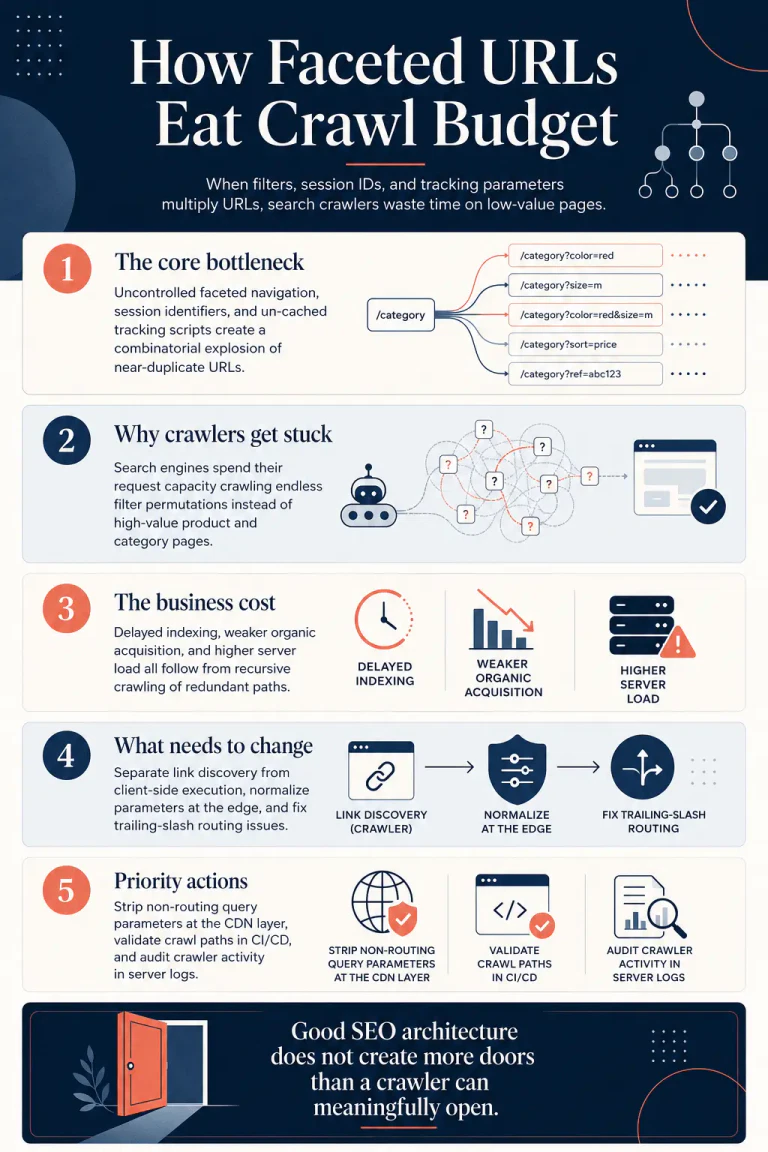
- 1. The core technical bottleneck Uncontrolled faceted navigation parameters, session identifiers, and un-cached tracking scripts generate a combinatorial explosion of near-duplicate URLs that drown search spiders in thin, redundant, and low-value crawl paths.
- 2. The indexing and crawl consequence Search engines consume their allocated request capacity processing redundant query parameters, forcing primary commercial category pages, product pages, and revenue-critical templates into longer and less predictable recrawl queues.
- 3. The business cost Delayed indexing of new inventory, reduced organic acquisition capacity, and inflated origin server overhead emerge when crawlers recursively request un-cached resource permutations instead of refreshing commercially meaningful URLs.
- 4. The architectural correction Effective recovery requires decoupling link discovery from client-side execution, enforcing edge-level parameter normalization, and correcting server-side trailing slash routing mismatches before they multiply duplicate crawl paths.
- 5. The implementation priority The highest-priority actions are to deploy declarative query-stripping rules at the CDN edge, implement automated crawler validation in the CI/CD deployment pipeline, and audit server log responses to ensure status code integrity.
Structural cannibalization occurs when a website architecture auto-generates infinite URL variants that compete with primary templates for search engine processing resources. Unlike content-level cannibalization, which involves keyword overlap between editorial pieces, structural cannibalization is a failure of routing and database output governance. While a human user navigating an online store is highly selective in their clicks, an automated search crawler is designed to extract and follow every path recursively, turning dynamic filter configurations into a massive combinatorial search space.
The mathematics of faceted filters
Faceted navigation configurations on e-commerce and directory platforms are the primary drivers of URL proliferation. When filter options are exposed as independent query parameters or path segments without strict control, the total number of crawlable addresses increases exponentially. Consider a single category page containing six distinct facet groups: brand (10 values), color (8 values), size (12 values), price (5 values), rating (4 values), and material (6 values). If these parameters are crawlable, a search engine bot will systematically attempt to request and evaluate these permutations, leading to immediate crawl budget leakage.
The resulting arithmetic produces a combinatorial pool of over 115,200 unique URLs from a single category page:
1 Category Page×10 Brands×8 Colors×12 Sizes×5 Prices×4 Ratings×6 Materials=115,200+ URLs
Instead of discovering new inventory, search spiders remain trapped in redundant filter variations that offer no incremental search demand or unique content. This activity triggers four compounding failures: crawl allocation waste, index bloat, duplicate content evaluation, and internal link equity dilution.
Crawl capacity limits vs crawl demand
The volume of page requests a search engine allocates to a given hostname is governed by two independent forces: crawl capacity limit and crawl demand. Crawl capacity represents the maximum parallel request volume a server can handle without performance degradation. This limit is adjusted dynamically based on server response latency, database query bottlenecks, and overall platform stability. Crawl demand reflects the search engine's intent to discover or refresh content, determined by template freshness, historical popularity, and perceived site quality.
The total allocated crawl budget is modeled as:
Crawl Budget=min(Crawl Capacity Limit,Crawl Demand)
When low-value parameter URLs dominate the crawl footprint, the perceived inventory quality deteriorates. In a documented case study, an e-commerce platform had 45% of its monthly crawler requests directed to parameterized facet URLs, while its sitemap contained 12,000 out-of-stock products, all served from an origin with an average response time of 1.2 seconds. By optimizing this footprint and resolving server-side performance bottlenecks, the platform reduced total crawl waste by 73%.
A host's crawl allocation is strictly partitioned by hostname; subdomains do not share a common budget. This design pattern requires enterprise architectures to isolate staging or code repositories on separate subdomains to prevent internal testing footprints from depleting production crawl limits.
| HTTP status code group | Crawl resource cost | Server optimization target |
|---|---|---|
| 1xx (Informational) | Does not affect crawl budget | N/A |
| 2xx (Success) | Consumes crawl budget | Maintain >95% success rate on canonical URLs |
| 3xx (Redirect) | Consumes crawl budget | Keep under 3% of total requests, eliminate chains |
| 4xx (Client Error) except 429 | Does not affect crawl budget | Fix internal 404 and 410 leaks |
| 5xx (Server Error) | Consumes crawl budget | Keep under 0.1% to avoid crawl rate throttling |
Companies routinely spend six figures on editorial production while Googlebot waits 1.8 seconds for Time to First Byte behind an overloaded WooCommerce stack. This is usually presented internally as a content scaling issue, yet no amount of content velocity can compensate for an origin server that actively throttles its own crawler allocation.
Developer-induced crawl traps and CI/CD validation
Crawler traps emerge when server configurations or dynamic applications generate an infinite pool of unique URLs for identical or non-existent resources. While these issues rarely affect human visitors, they severely disrupt the automated systems responsible for indexing the site.
Path-embedded session IDs and asset caching
Standard session-handling practices represent a common source of crawler trap expansion. To track users who have disabled cookies, legacy server configurations often append session identifiers directly into the path string, such as the jsessionid attribute in Java-based application servers. Because search engine crawlers operate as distributed systems, sending requests from thousands of unique IP addresses, they do not preserve cookies across sessions.
Consequently, every request from a new crawler IP triggers the generation of a unique session ID. The crawler is forced to navigate infinite variations of identical paths, viewing each as a newly discovered page. This behavior can only be resolved by disabling path-embedded session identifiers within the web server configuration file.
A similar breakdown occurs with image resizing and cache-busting integrations. For example, certain Magento caching plugins save new versions of page resources every time a change is made and automatically resize images to support various devices. Because modern search engine crawlers aggressively fetch page assets like images and stylesheets, they will attempt to crawl every resized version of every image. This can inflate static asset request volume up to 100 times the actual size of the website, exhausting server capacity.
To prevent these traps, developers should write parameters as URL fragments (using the # symbol) rather than unique query paths, as search engine crawlers completely ignore URL fragments during discovery.
Pipeline automated crawling tests
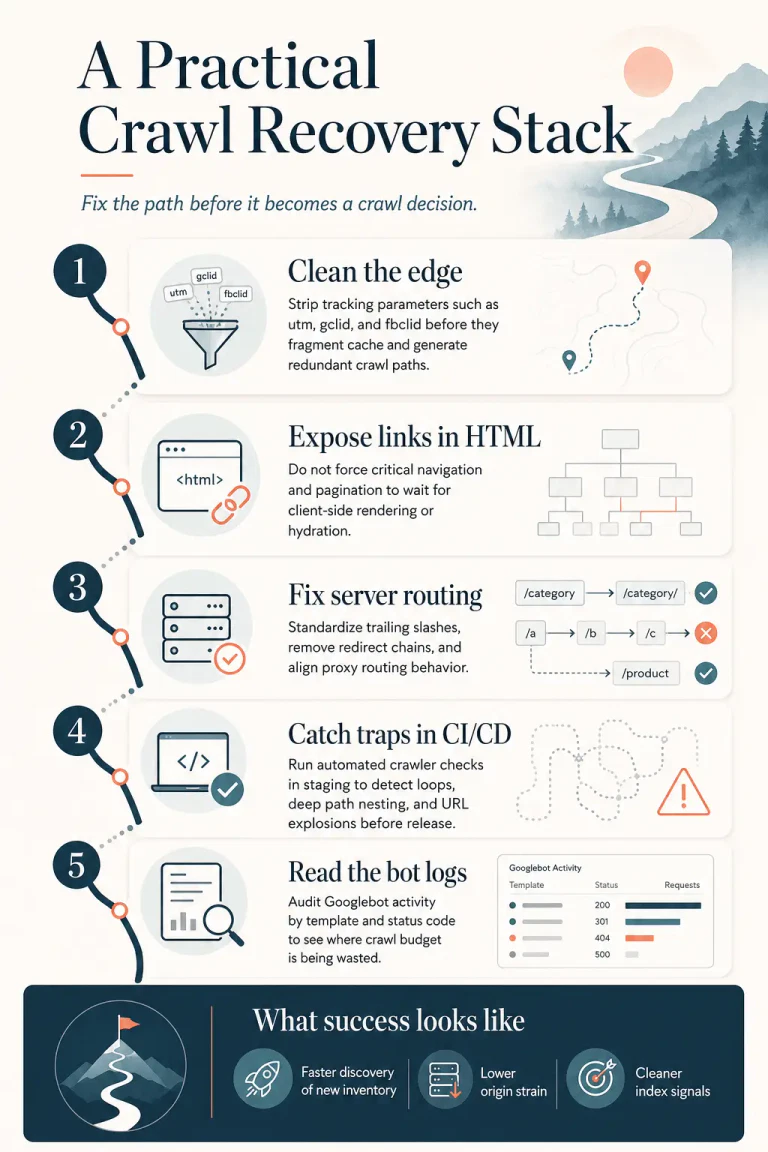
To prevent structural regressions from reaching production environments, automated validation must be integrated directly into continuous integration and continuous deployment pipelines. Relying on manual post-deployment audits guarantees that indexing issues will be discovered only after crawl capacity has already been degraded.
The following script is an illustrative Python-based crawler designed to run within a pipeline runner, such as CircleCI, to detect infinite URL loops before code is merged:
|
1 2 3 4 5 6 7 8 9 10 11 12 13 14 15 16 17 18 19 20 21 22 23 24 25 26 27 28 29 30 31 32 33 34 35 36 37 38 39 40 41 42 43 44 |
import sys from urllib.parse import urljoin, urlparse import requests from bs4 import BeautifulSoup def audit_pipeline_crawl(start_url, max_pages=1000): visited = set() queue = [start_url] depth_tracker = {} depth_tracker[start_url] = 0 while queue: current_url = queue.pop(0) if current_url in visited: continue visited.add(current_url) if len(visited) > max_pages: print(f"FAILED: Potential crawl trap detected. Exploded beyond {max_pages} URLs.") sys.exit(1) try: response = requests.get(current_url, timeout=5, headers={"User-Agent": "CI-Test-Crawler/1.0"}) if response.status_code == 200: soup = BeautifulSoup(response.text, 'html.parser') for link in soup.find_all('a', href=True): absolute_link = urljoin(current_url, link['href']) parsed_link = urlparse(absolute_link) # Keep crawl restricted to local domain staging environment if parsed_link.netloc == urlparse(start_url).netloc: # Identify URL patterns that grow indefinitely if len(parsed_link.path.split('/')) > 10: print(f"FAILED: Infinite path nesting detected: {absolute_link}") sys.exit(1) if absolute_link not in visited and absolute_link not in queue: queue.append(absolute_link) except requests.exceptions.RequestException as e: print(f"Warning: Failed to fetch {current_url} during audit: {e}") if __name__ == "__main__": audit_pipeline_crawl("http://127.0.0.1:8080/") print("SUCCESS: Crawl depth and URL validation passed.") |
By enforcing strict limits on path nesting and total crawled URLs in staging environments, engineering teams can catch dynamic parameters and loop errors before they impact the production crawl budget.
JavaScript hydration and rendering queue latency
Modern frontend frameworks defer HTML generation to the client, adding significant processing overhead to search engine indexing pipelines. This architectural approach forces a multi-stage discovery cycle that delays content indexation.
The deferred rendering pipeline bottleneck
Search engine crawlers separate URL processing into two distinct phases: immediate parsing of raw HTML and deferred rendering of dynamic content. During Phase 1, the crawler fetches the raw page response, parses static elements, extracts standard hypermedia links, and immediately indexes static copy.
If the page relies on client-side frameworks for content generation, the URL is placed into a deferred rendering queue for Phase 2. Here, the page must wait for available compute resources to execute JavaScript via a headless browser engine.
For established sites with consistent crawl profiles, the transition from discovery to final rendering may occur within hours, but low-authority sites or complex JavaScript architectures frequently experience rendering delays of several weeks. This lag directly translates to discovery latency for new product listings, pricing updates, and inventory changes.
Why do organizations allocate six figures to content velocity while their web platforms require Chromium-based hydration to expose primary navigation links?
If critical navigation menus, pagination elements, or structural interlinking are injected purely through client-side JavaScript, search spiders cannot discover these links during Phase 1. They remain blind to the deeper site structure until the rendering queue resolves. Additionally, dynamic "load more" components that rely on click events to append items are completely ignored by automated user agents, as search bots do not perform human-equivalent scroll or click interactions.
Client-side execution budgets
To minimize main-thread execution blocks and avoid Interaction to Next Paint penalties, production bundles must adhere to a strict compressed weight threshold of 200KB, with individual task execution capped at 50ms. Utilizing server-side rendering ensures that the fully formed Document Object Model is delivered directly in the initial HTTP payload. This execution pattern allows search bots to discover links and index primary textual assets during Phase 1, entirely bypassing the rendering queue bottleneck.
When rendering becomes a dependency for URL discovery, the crawl path becomes fragile. If rendering resources run thin, low-value pages in the queue can block high-value, revenue-generating templates from receiving recrawl attention.
Edge-level parameter normalization and cache rates
Marketing campaigns, advertising networks, and internal tracking packages routinely append ephemeral parameters to URL queries. If these parameters are passed directly to the origin server, they cause cache fragmentation, diminish caching efficiency, and trigger unnecessary crawling.
Normalizing tracking strings at the edge
Web application performance data indicates that only 44% of mobile origins maintain a fast Time to First Byte. Normalizing tracking parameters at the CDN edge before requests reach the caching tier or origin server can increase cache hit rates by 3% while reducing origin bytes by 5%.
By cleaning incoming query strings of non-routing variables (e.g., gclid, utm_source, fbclid), the platform treats different tracking clicks to the same page as a single cached entity. This optimization preserves user-facing tracking capabilities in the browser while protecting the origin server from redundant queries.
For lightweight operations, edge rules can strip parameters declaratively. However, complex environments require programmatically intercepting requests during the TLS handshake.
The following Cloudflare Worker script demonstrates how to strip targeted tracking parameters from incoming requests:
|
1 2 3 4 5 6 7 8 9 10 11 12 13 14 15 16 17 18 19 20 21 |
export default { async fetch(request) { const url = new URL(request.url); const trackingRegex = /^(utm_|gad_|gclid|gclsrc|wbraid|gbraid|dclid|fbclid|fb_action_|srsltid|msclkid|ttclid|twclid|li_fat_id|epik|igshid|_ga$|_gl$|mc_[ce]id|_hs[em])/; const keysToDelete =; for (const [key] of url.searchParams) { if (trackingRegex.test(key)) { keysToDelete.push(key); } } // Collect keys first to avoid live iterator mutation issues for (const key of keysToDelete) { url.searchParams.delete(key); } const modifiedRequest = new Request(url.toString(), request); return await fetch(modifiedRequest); } }; |
This worker runs with minimal compute overhead (typically under 1ms), sanitizing incoming requests before they trigger downstream rendering or caching logic.
Declarative rewrites vs serverless workers
Deploying edge logic requires balancing execution costs against processing requirements. While fully featured workers handle complex scripting, Cloudflare Snippets offer a declarative alternative for paid plan architectures, operating within a strict resource limit of 5ms execution time, 2MB memory, and a 32KB package size.
| Optimization tier | Plan requirements | Memory & Exec limits | Primary use case |
|---|---|---|---|
| Transform Rules | All plans (Free to Enterprise) | No code execution limits | Simple static parameters (e.g., remove_query_args()) |
| Cloudflare Snippets | Paid plans (Pro: 25, Business: 50, Enterprise: 300) | 5ms max time, 2MB memory, 32KB package | Lightweight regex matching, header injection |
| Cloudflare Workers | All plans (usage-based, includes free tier) | Standard CPU execution allocations | Stateful routing, KV database query integrations |
Regardless of the execution tier, standardizing incoming URL structures before they reach caching layers or web application firewalls reduces origin server response volatility, preventing the 5xx errors that cause search engine crawl limits to be throttled.
Server-side routing rules and trailing slash alignment
Inconsistent URL structures create duplicate crawl paths that degrade indexing stability. If a single logical resource is resolvable with and without a trailing slash, search spiders treat them as distinct pages, which dilutes link equity and splits indexing signals.
Nginx slash rewrites and query strings
To maintain routing consistency, web platforms must enforce a single, global standard for trailing slashes. In Nginx, this redirection is typically handled via rewrite directives in the primary server configuration block.
The rule below forces a 301 permanent redirect for any URI that lacks a trailing slash, while explicitly protecting files containing extension periods from receiving a trailing slash:
|
1 2 |
# Append trailing slash to non-file URIs lacking one rewrite ^([^.]*[^/])$ $1/ permanent; |
This directive intercepts incoming clean paths (e.g., /category-page) and permanently redirects them to their canonical trailing-slash equivalent (/category-page/), preserving any appended query parameters during the redirect.
|
1 2 3 4 5 6 7 |
# Strip query arguments and force trailing slash redirect location ~ (.*)/$ { if ($query_string) { return 301 $scheme://$host$1/?$query_string; } return 301 $scheme://$host$1/; } |
This configuration ensures query parameters are carried over safely without breaking application-level routing.
proxy_pass trailing slash scenarios
A common source of routing errors is the configuration of the trailing slash in the Nginx proxy_pass directive. When a location prefix matches an incoming URI, Nginx modifies the path sent to the backend depending on whether the proxy_pass destination contains a URI component.
|
1 2 3 4 |
# Scenario A: No URI component in proxy_pass location /squaremap { proxy_pass http://127.0.0.1:39000; } |
In Scenario A, the incoming URI is passed to the upstream server completely unchanged. A request to /squaremap/users goes to the backend as /squaremap/users.
|
1 2 3 4 |
# Scenario B: URI component present (trailing slash) location /squaremap/ { proxy_pass http://127.0.0.1:39000/; } |
In Scenario B, the trailing slash in the proxy_pass directive constitutes a URI path (/). Nginx strips the matching location prefix (/squaremap/) from the incoming URI and appends the remainder to the proxy path. A request to /squaremap/users is forwarded to the backend as /users.
Configuring a path without a trailing slash in the location block while appending a slash to the proxy_pass directive can result in doubled slashes (such as //users), which triggers backend routing failures.
To bypass this behavior when using regular expression matching within location blocks, developers should use the rewrite directive with the break flag to transform the URI prior to proxying:
|
1 2 3 4 |
location ~ ^/api/(.*)$ { rewrite ^/api/(.*)$ /v2/$1 break; proxy_pass http://backend; } |
This rewrite rule maps paths dynamically without relying on the automatic stripping behavior of Nginx's proxy parsing logic.
Mitigating canonical drift and index bloat
When search engines crawl parameterized versions of pages, developers often attempt to mitigate indexation issues using self-referencing canonical tags. However, this approach can lead to a condition known as canonical drift, where the crawler continues to request these URLs because the canonical tag does not restrict crawl access.
The limitation of soft directives
Because a canonical tag is a soft recommendation rather than a hard directive, search bots must first fetch and parse the page to discover the tag. If a platform has hundreds of thousands of active filter URLs, this discovery process consumes the crawl budget long before the canonical signal is ever executed.
This sequence still consumes server resources and crawl allocation. To protect the crawl capacity of larger hostnames, platforms must use hard disallow rules in the robots.txt file to block crawlers from entering parameterized search spaces.
|
1 2 3 4 |
User-agent: * Disallow: /*?*color= Disallow: /*?*size= Disallow: /search/ |
This prevents the search engine from fetching the URL entirely.
However, if a page is blocked via robots.txt, search bots cannot read any indexation directives on that page, such as a noindex tag or an HTTP header. If a URL was indexed prior to the implementation of the block, it may remain in the search index because the crawler cannot access the page to discover the removal instruction.
To clean up index bloat, operators must first serve a noindex directive, allow search bots to crawl and process the removal signal, and only then implement the robots.txt crawl block.
Additionally, relying on a long-term noindex, follow pattern is highly unreliable. Over extended periods, search engines reduce crawl frequency on non-indexed pages, meaning the follow directive will eventually fail to pass internal link signals.
Site-wide directive injection at the server level
For non-HTML assets that cannot host a meta robots tag, platforms must use the HTTP response header X-Robots-Tag. This header communicates indexing rules to crawlers during the initial server handshake, before the document body is parsed.
The following Nginx configuration demonstrates how to inject the header to prevent the indexation of PDFs and static assets across specific directories:
|
1 2 3 |
location ~* \.pdf$ { add_header X-Robots-Tag "noindex, nofollow"; } |
This directive injects the header directly into the HTTP response payload for PDF files, instructing search engines to ignore these assets during crawl execution and protecting the primary index from thin-content bloat.
To audit these issues at scale, engineering teams should configure log export pipes (such as Grafana or Loki) targeting Googlebot user-agents. Tagging pagination, faceted-filter, and tracking-beacon logs inside server-side configurations allows teams to trace crawl activity directly to organic acquisition value. Aligning server metrics with actual indexing behavior is the only reliable way to prevent structural cannibalization from degrading organic performance.


