

For users, this process is usually invisible. A page loads quickly, then menus, filters, forms, shopping carts, and personalized interface elements become interactive. The problem begins when the HTML generated on the server does not match what React, Vue, or another framework expects to render on the client. This discrepancy is known as a hydration mismatch.
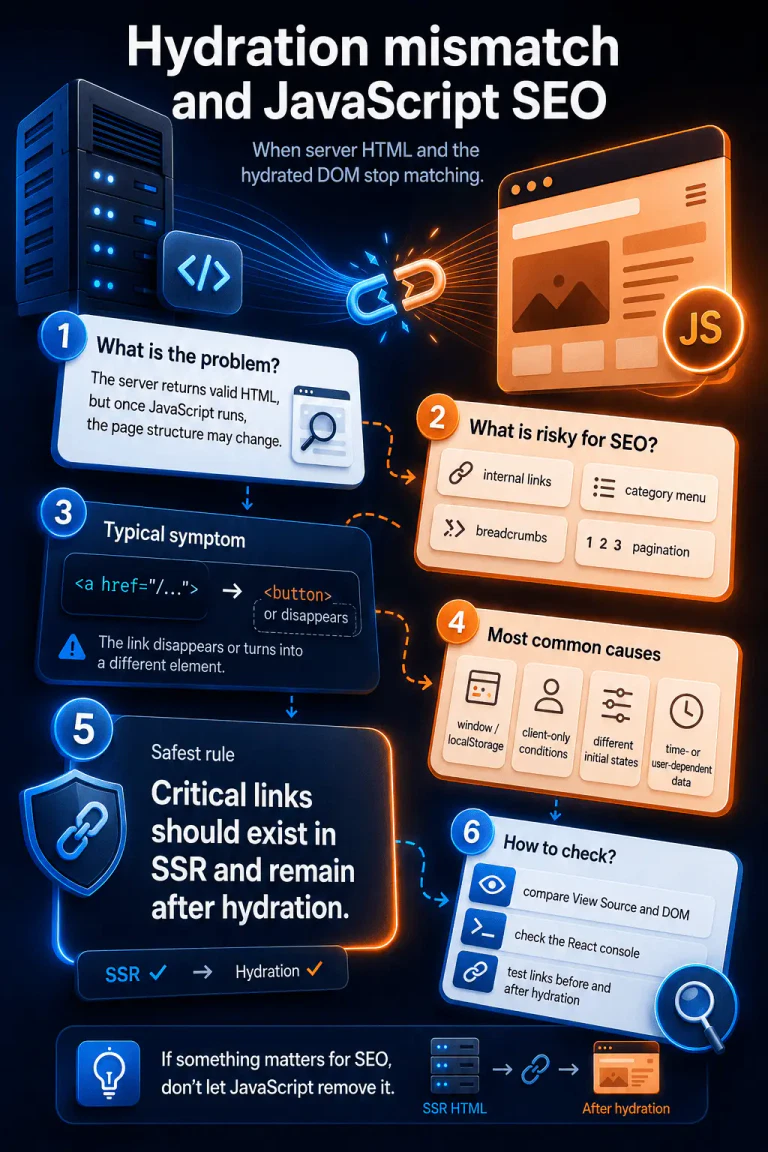
From an SEO perspective, not every mismatch is critical. A slightly different timestamp, a small text variation, or a dynamically added visual badge will usually not create a serious indexation issue. The risk increases when the mismatch affects structural elements: internal links, category menus, pagination, breadcrumbs, related-content blocks, or any other section responsible for URL discovery.
At that point, the issue is no longer only a front-end concern. The crawler may effectively encounter two different versions of the same page.
Why hydration matters for internal linking
In simplified terms, a crawler first receives the HTML returned by the server. Then, when necessary, it may render the page, execute JavaScript, and evaluate the final DOM. This means that search engines can process both the server-delivered document and the rendered version after JavaScript execution.
If the server returns a valid internal link such as:
<a href="/category/technical-seo">Technical SEO</a>but after hydration that element becomes:
<button>Technical SEO</button>or disappears because of client-only conditional logic, the page begins sending inconsistent structural signals. A link that was supposed to support crawlability and internal PageRank flow is no longer stable.
This does not mean that Googlebot will always ignore the target URL. It means that the internal linking architecture becomes less predictable. The risk is especially high in large websites: e-commerce platforms, publishers, service directories, marketplaces, and programmatic SEO projects where thousands of URLs depend on stable navigation, category trees, listing pages, and pagination.
The safest rule is simple: critical internal links should exist in the server-rendered HTML and remain present after hydration.
A typical hydration mismatch scenario
A hydration mismatch can create a situation where the server and the client expose different link structures.
|
1 2 3 4 5 6 7 8 9 |
Server-rendered HTML: <nav> <a href="/deep-category">Technical Category</a> </nav> DOM after hydration: <nav> <div>Loading...</div> </nav> |
The opposite scenario is also problematic:
|
1 2 3 4 5 6 7 8 9 |
Server-rendered HTML: <nav> <div>Loading...</div> </nav> DOM after hydration: <nav> <a href="/deep-category">Technical Category</a> </nav> |
In the second case, the link appears only after JavaScript execution. Google may still discover it, but this is less robust than exposing the link directly in the server-rendered HTML.
For SEO-critical navigation, the goal should not be “the link eventually appears.” The goal should be structural consistency between the initial HTML and the hydrated DOM.
How to detect hydration mismatches
The first warning sign is usually visible in the browser console. In React-based applications, errors may look like this:
|
1 |
Warning: Text content did not match. Server: "X" Client: "Y" |
or:
|
1 |
Warning: An error occurred during hydration. The server HTML was replaced with client content. |
These warnings do not always indicate an SEO problem. They may be caused by dates, random IDs, user-specific labels, counters, or time-dependent values. In technical SEO diagnostics, the key question is whether the mismatch affects elements responsible for URL discovery.
Two page states should be compared:
- Server-rendered HTML - available through “View Page Source”.
- Rendered DOM - visible in DevTools after JavaScript execution.
If the page source contains an <a href="..."> element, but the inspected DOM shows a div, a button, an empty container, or no equivalent element at all, the issue deserves closer analysis.
The common cause: environment-dependent rendering
Hydration mismatches often appear when a component behaves differently on the server and in the browser. Typical triggers include window, localStorage, viewport width, dates, time zones, user state, cookies, or browser-only APIs used during the first render.
A problematic implementation may look like this:
|
1 2 3 4 5 6 7 |
export default function Navigation() { if (typeof window !== 'undefined' && window.innerWidth > 768) { return <a href="/deep-category">Desktop Category</a>; } return <div>Loading...</div>; } |
On the server, window does not exist, so the component returns a fallback div. In the browser, the condition may be true, so React attempts to hydrate a different structure. If this happens inside navigation, pagination, breadcrumbs, or category listings, the issue can affect crawlability and indexation signals.
A safer component architecture
SEO-critical components should render the same structural output on the server and during the first client render. Dynamic elements can be added after hydration, but they should not determine whether important links exist.
A safer version would look like this:
|
1 2 3 4 5 6 7 8 9 10 11 12 13 14 15 16 17 18 19 20 21 |
import { useEffect, useState } from 'react'; export default function ValidNavigation() { const [isMounted, setIsMounted] = useState(false); useEffect(() => { setIsMounted(true); }, []); return ( <nav> <a href="/deep-category">Safe Structural Category Link</a> {isMounted && ( <span className="client-badge"> Dynamic User Tag </span> )} </nav> ); } |
In this example, the internal link exists in the server-rendered HTML and remains present during the first client render. Only the non-critical dynamic badge is added later. This protects the structural layer that search engines rely on for URL discovery.
Why suppressHydrationWarning is not a real SEO fix
React and Next.js provide suppressHydrationWarning as an escape hatch for cases where a mismatch is expected. However, this option only suppresses the warning. It does not fix the underlying structural drift.
For minor time-dependent text, this may be acceptable. For navigation, internal links, pagination, breadcrumbs, and category trees, hiding the warning does not make the page more crawlable. A link can still disappear, change semantics, or appear only after JavaScript execution.
From a technical SEO perspective, the objective is not a clean console. The objective is a stable link structure across server-rendered HTML and the hydrated DOM.
Manual diagnostic workflow
A simple audit can be performed without additional tools.
Open the page in an incognito window, launch Chrome DevTools, and check the console after refreshing the page. Then open the page source and search for important internal links: categories, subcategories, products, articles, service pages, pagination URLs, or breadcrumb URLs.
Next, return to the rendered page, right-click the same area, and choose “Inspect”. This shows the live DOM after JavaScript execution.
During the comparison, the most important questions are:
Does the link exist in the server-rendered HTML?
Does the same link still exist after hydration?
Is it still an <a href="..."> element, rather than a button or div with a click handler?
Was the href removed, changed, or replaced by JavaScript navigation?
Are pagination, breadcrumbs, and category links available without user interaction?
This comparison helps determine whether the issue is merely a harmless React warning or a genuine structural SEO problem.
Automating the test: comparing links before and after hydration
In larger projects, manual checks are not enough. A better approach is to create an automated test that downloads the server-rendered HTML, renders the page in a headless browser, and compares the sets of links found in key areas such as navigation, breadcrumbs, pagination, product listings, or related-content modules.
The example below is not a complete monitoring system, but it shows a more reliable direction than a simple string check. Instead of only checking whether a text fragment exists, it compares actual href values.
|
1 2 3 4 5 6 7 8 9 10 11 12 13 14 15 16 17 18 19 20 21 22 23 24 25 26 27 28 29 30 31 32 33 34 35 36 37 38 39 40 41 42 43 44 45 46 47 48 49 50 51 52 53 54 55 56 57 58 59 60 61 62 63 64 65 66 67 68 69 70 71 72 73 74 75 76 77 78 79 80 81 82 83 84 85 86 87 88 89 90 91 92 93 94 95 96 97 98 99 100 101 102 103 104 105 |
const axios = require('axios'); const cheerio = require('cheerio'); const puppeteer = require('puppeteer'); function normalizeHref(href, baseUrl) { if (!href) return null; try { const url = new URL(href, baseUrl); url.hash = ''; return url.pathname + url.search; } catch { return null; } } function extractLinks(html, selector, baseUrl) { const $ = cheerio.load(html); const links = new Set(); $(selector) .find('a[href]') .each((_, element) => { const href = normalizeHref($(element).attr('href'), baseUrl); if (href) { links.add(href); } }); return links; } function diffSets(serverSet, renderedSet) { return { missingAfterHydration: [...serverSet].filter( link => !renderedSet.has(link) ), addedAfterHydration: [...renderedSet].filter( link => !serverSet.has(link) ), }; } async function auditHydrationLinks(targetUrl, selector = 'nav') { console.log(`Auditing links for: ${targetUrl}`); console.log(`Target selector: ${selector}`); const userAgent = 'Mozilla/5.0 (compatible; Googlebot/2.1; +http://www.google.com/bot.html)'; const serverResponse = await axios.get(targetUrl, { headers: { 'User-Agent': userAgent, }, timeout: 15000, }); const serverHtml = serverResponse.data; const serverLinks = extractLinks(serverHtml, selector, targetUrl); const browser = await puppeteer.launch({ headless: true, }); const page = await browser.newPage(); await page.setUserAgent(userAgent); await page.goto(targetUrl, { waitUntil: 'networkidle2', timeout: 30000, }); const renderedHtml = await page.content(); await browser.close(); const renderedLinks = extractLinks(renderedHtml, selector, targetUrl); const diff = diffSets(serverLinks, renderedLinks); if ( diff.missingAfterHydration.length > 0 || diff.addedAfterHydration.length > 0 ) { console.error( 'Differences detected between server-rendered HTML and hydrated DOM.' ); if (diff.missingAfterHydration.length > 0) { console.error('\nLinks present in server HTML but missing after hydration:'); console.error(diff.missingAfterHydration); } if (diff.addedAfterHydration.length > 0) { console.warn('\nLinks added only after hydration:'); console.warn(diff.addedAfterHydration); } return false; } console.log('Link structure is consistent before and after hydration.'); return true; } auditHydrationLinks('https://example.com', 'nav'); |
This type of test can be extended with separate selectors for:
|
1 2 3 4 5 6 7 |
nav .breadcrumbs .pagination .category-grid .product-listing .related-posts .footer-links |
It can also be integrated into a deployment pipeline. If SEO-critical links disappear after hydration, the deployment can be stopped before the change reaches production.
What should be monitored?
Not every difference between server HTML and hydrated DOM should block deployment. Some changes are expected and harmless. For SEO, the focus should remain on stable access to crawlable URLs.
The most important elements to monitor are:
|
1 2 3 4 5 6 7 8 |
Main navigation Category menus Breadcrumbs Pagination Product or article listings Related-content modules Footer links Canonical internal pathways to important landing pages |
Dynamic account links, cart indicators, personalization badges, tracking labels, or interface-only controls usually matter less for indexation.
The distinction is practical: SEO-critical links should be stable. UI-only enhancements may remain dynamic.
Final recommendation
Hydration mismatch is not automatically an SEO disaster. It becomes dangerous when it changes the structure of internal linking. A visually functional page can still provide unstable crawl signals if critical links are missing from the server-rendered HTML or disappear after JavaScript execution.
For JavaScript-heavy websites, the safest technical standard is clear:
Render critical internal links on the server, preserve them during hydration, and add client-only enhancements only after the structural layer is already stable.
This approach protects both user experience and search engine accessibility. It also reduces the risk that deep URLs, category pages, product pages, or programmatic landing pages become harder to discover because of client-side rendering drift.


