
SEM · Google Ads conversion goals
Check the campaign before changing the action
Three settings checks explain more than the Primary or Secondary label on its own.
- Secondary has a documented exceptionA selected custom goal can make its included Secondary actions biddable.
- Assignment mattersFinding a custom goal in the account does not prove that a particular campaign uses it.
- Defaults have a scopeA campaign using its own goals does not automatically follow later account-default edits.
Yes, Google Ads can use a Secondary conversion action for bidding when a campaign uses a custom goal containing that action. Google states this exception in its Primary and Secondary conversion guidance. The label has not been ignored; another part of the configuration changes how the action is selected.
Imagine a business that tracks both completed inquiries and brochure downloads. The team considers downloads useful for analysis but insufficient evidence of sales intent, so it marks that action Secondary. Before declaring the job finished, somebody still needs to inspect the campaigns that might use it.
Keep the download unchanged and compare two campaigns
The Google Ads API overview separates an action’s primary_for_goal setting from its goal configuration. Standard goals group actions by category and origin. A custom goal instead names particular actions. That distinction lets us change the campaign relationship without pretending that the download became a different customer behavior.
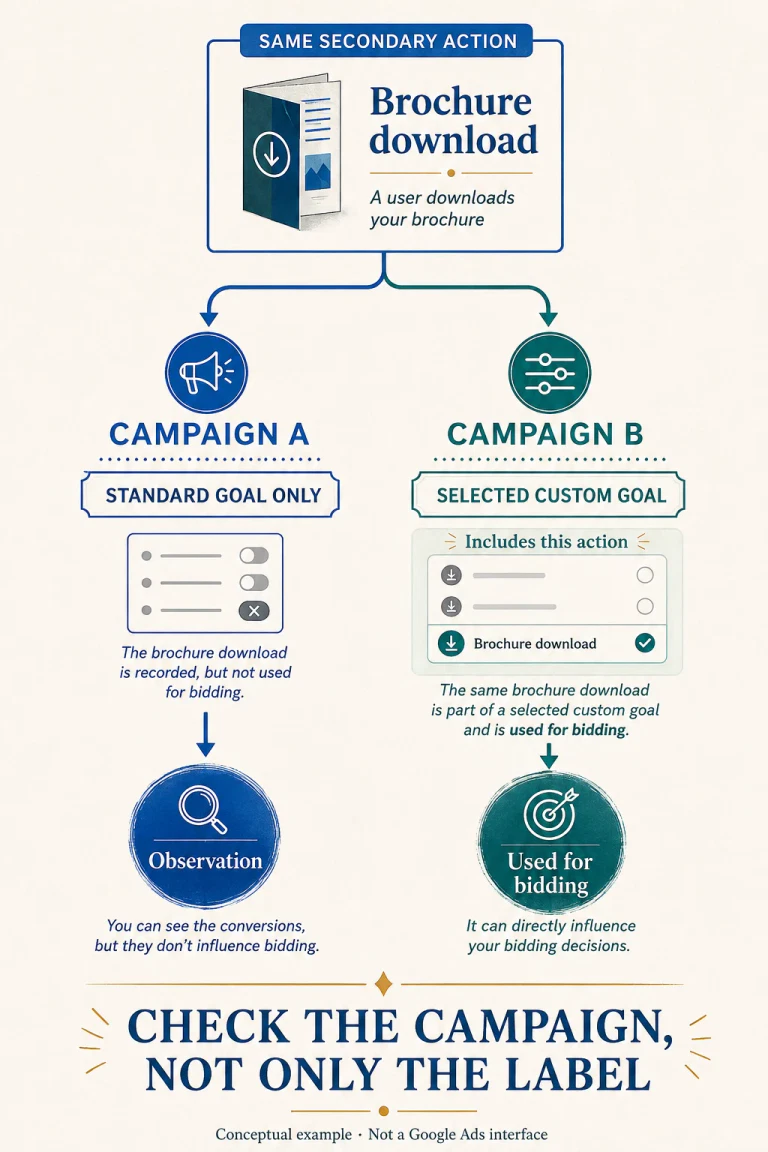
Synthetic example: these are invented Search campaigns using conversion-based Smart Bidding and an enabled, ordinary website conversion. They are not account data, an auction simulation or a recommendation to optimize for brochure downloads.
Campaign A
Action: Brochure download
Action setting: Secondary
Standard goal: Selected
Custom goal: None
Result: the download remains observational.
Campaign B
Action: The same brochure download
Action setting: Still Secondary
Standard goal: Selected
Custom goal: Selected and contains this action
Result: the download is selected for bidding through the custom goal.
The resource contract makes the second route explicit: CustomConversionGoal.conversion_actions lists the actions made biddable by that custom goal. Looking only at the download’s row would miss the relevant difference between A and B.
A custom goal elsewhere in the account proves little
Two additional cases prevent the example from turning into another oversimplified rule:
- Campaign C: the brochure action belongs to a custom goal, but C does not use that goal. It uses only the same selected standard goal as A. The Secondary download is not an explicitly selected bidding action for C.
- Campaign D: a completed-purchase action is Primary, but its standard goal is not selected and no selected custom goal contains it. The Primary label alone does not make it an explicit optimization goal for D.
Nor does selecting a custom goal necessarily remove every standard goal. Google’s campaign-specific settings guide permits combining them. In our extra control case, a Primary purchase remains selected through its standard goal even when the campaign’s custom goal contains a different action.
We checked a small Boolean model against 16 combinations and six named cases, plus two inheritance checks below. Those checks establish consistency with the documented rules. They do not independently test Google’s implementation, quantify signal weight or predict performance.
The account-default edit can miss the campaign you meant to fix
There is a second configuration trap. Google’s Campaign goals API guide, updated 19 August 2026, says that overriding customer-level goals stops subsequent customer-goal updates from being applied to that campaign’s goals. This also happens when the campaign uses a custom goal.
The practical exception also appears in Google’s account-default documentation: the default applies across campaigns except those using campaign-specific goals. A clean-looking account default therefore does not describe every campaign underneath it.
Consider another synthetic setup. Two campaigns initially select the same standard goal. One follows account defaults; the other has explicitly overridden campaign settings. An account-level edit then deselects that goal. The inheriting campaign follows the edit, while the overridden campaign retains its own selection. No tag failure is required to explain the difference. This independence concerns campaign goals; it does not create a separate copy of the underlying conversion action.
Inspect three relationships before touching tracking
Start with a read-only review. The official campaign settings instructions describe adding the Conversion goals column to the Campaigns table. Use it to identify the relevant campaigns, then inspect the goal details rather than stopping at a summary label.
- Identify the action precisely. Record its name, identifier, conversion source and Primary/Secondary setting. Check that colleagues mean the same event; “lead” can be a business shorthand for several different actions.
- Record the campaign’s selected standard goals. Establish whether it follows account defaults or has its own settings. A screenshot of account-wide goals alone cannot finish this step.
- Inspect the selected custom goal, if any. Record its identity and included action identifiers. Keep “exists,” “contains this action” and “assigned to this campaign” as separate observations.
- Compare that configuration with the intended outcome. Ask why the campaign should optimize for this action. Record the answer before proposing a setting change, not after the performance chart moves.
For an API-based audit, Google documents goal_config_level, the selected custom_conversion_goal, and the goal’s conversion_actions relationship. Inspect standard-goal category, origin and biddable settings too. This article supplies no untested account query and performs no API requests against an advertiser.
A correct diagnosis still needs a business decision
A custom goal can be deliberate. It may select a useful subset of actions where broader standard grouping is unsuitable. Finding one is not a reason to delete it. The useful output is a named configuration difference and its owner, followed by a decision about what the campaign should pursue.
This adds a necessary check to our discussion of keeping early messaging events diagnostic: the Secondary setting must be considered alongside custom-goal assignment. It does not replace CRM qualification or prove that a conversation became a sale.
If the event itself is duplicated or incorrectly captured, investigate the measurement implementation separately. If the configuration needs an approved change, keep a before-and-after record, as in our Google Ads change-audit guide. Current settings do not reconstruct which goals were active during an older reporting period. Neither observation justifies changing tags, goals, budgets and targets together.
One final limit matters: Google notes that some Primary actions not used for optimization may still enhance predictions. Our examples concern explicitly selected conversion goals, not every possible model input. They establish no expected CPA improvement. App campaigns and special action types also require their own documentation.
Questions about Secondary actions and custom goals
Should every Secondary action be removed from custom goals?
No. First establish which campaign uses the goal and why the action is included. The appropriate configuration depends on that campaign’s intended outcome.
Does appearing in All conversions prove an action is used for bidding?
No. Google’s reporting guidance retains observations outside selected campaign goals in All conversions. A report column alone is not a configuration audit.
Can this example show that my current results are wrong?
No. It identifies settings worth inspecting. It neither accesses your account nor tests attribution, tracking accuracy or the value of your customers.
Official documentation
Six Google sources checked 8 September 2026
- Primary and secondary conversion actions
- Conversion goals API overview — updated 19 August 2026
- Campaign goals API guide — updated 19 August 2026
- CustomConversionGoal resource — API v25, updated 22 July 2026
- Campaign-specific conversion goals
- Account-default conversion goals
The rules are documented behavior, not a newly announced feature. The examples are synthetic editorial checks, not a live Google Ads experiment.