
Measurement diagnosis · Digital marketing
Three controls behind the count
Use these distinctions to trace duplicate views from one virtual screen.
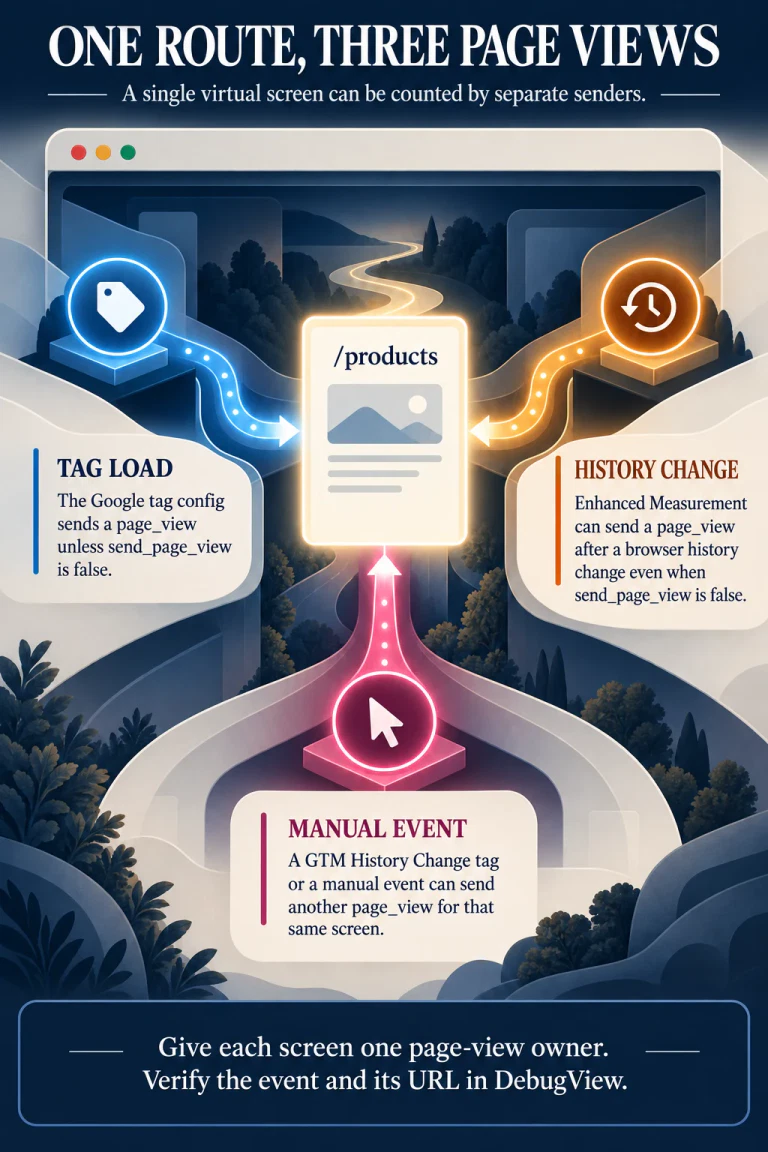
- The Google tag and Enhanced Measurement have different switches.Setting send_page_view: false suppresses the view from that config call. History-based views have a separate setting.
- A manual route tag adds a third possible sender.A GTM History Change trigger can send another page_view for the same virtual screen.
- Choose one owner for each screen.Check the event sequence and page_location in Tag Assistant and DebugView before changing the setup.
A developer sees two page_view events for /products after one click. The first instinct is to find a duplicated Google tag. That is a sensible check, but the tag may have loaded only once. In a single-page application (SPA), a route can change without a document reload. GA4 can observe that history change, while the app or its Tag Manager container separately sends a manual view.
This distinction matters when a team sets send_page_view: false and still sees extra views. The setting controls one sender. It does not retire every path that can create the event. Google's page-view guide explicitly says Enhanced Measurement can send views on browser history changes independently of send_page_view.
Follow one route through the three senders
Imagine a visitor loads /home and then navigates within the app to /products. The URL changes through the browser History API; the document stays in place. The comparison is a diagnostic model of three possible senders, not a claim that every SPA has all three enabled.
Google tag configuration
The initial config call normally sends a view when the tag loads. Inspect send_page_view on that call and repeat the setting on each full document load where needed.
Enhanced Measurement
A browser history change can create a view even when the config call has send_page_view: false. Inspect Page changes based on browser history events in the GA4 web stream.
Manual route measurement
A GTM History Change trigger or application event call can send a view for the virtual route. Inspect the trigger, GA4 Event tag and application code.
The initial tag-load event and the route event happen at different moments in this example. Duplication occurs when two enabled senders both count the same intended screen change. One common combination is Enhanced Measurement's history listener plus a manual GTM History Change event. Another is a manually sent initial view while the configuration call still sends its default view. The exact sequence depends on the site's implementation; infer it from observed events, not from a report total alone.
Our WordPress Google Ads setup guide checks whether two installations inject the base tag. An SPA can have one installation and still have two route-view senders. It also differs from a purchase ID losing precision before the tag fires: here the event's identity is intact, but its ownership is ambiguous.
Reproduce the extra event before editing the container
Use a test route with a known URL. Open GTM Preview and GA4 DebugView, load the starting screen, then navigate once to the new virtual screen. Record the ordered page_view events, their page_location, and the action that triggered each one. Google's SPA measurement guide recommends checking the new view in DebugView and comparing its location and referrer with the preceding view.
If two events appear for the same route transition, inspect the GTM timeline for a History Change event and a GA4 Event tag that sends page_view. Then inspect the web stream's Enhanced Measurement history setting. A send_page_view: false setting on the Google tag does not settle the second question. For a manually controlled setup, Google's GTM SPA tutorial starts by disabling automatic history-based views before creating the History Change tag.
Check the first document load separately. The send_page_view parameter does not persist across pages, according to Google's page-view guide. A multi-page shell or another full reload may therefore restore a default tag-load view if that configuration does not repeat the setting. DebugView should show the intended number of views for the initial screen and for one subsequent navigation, with the correct URL on each.
Give the screen a single owner
There are two coherent ways to measure virtual routes. The simpler one uses Enhanced Measurement's history detection and does not also send manual history-triggered views. The more controlled one sends the route view explicitly and disables GA4's automatic history-based views. If manual measurement also owns the initial screen, suppress the configuration call's initial view and send that screen's event deliberately. Avoid mixing pieces of the two setups without a count for each screen.
The manual approach is useful when the application knows when a screen has actually become visible. A history update does not always mean the visitor saw a new page. An app might call replaceState() to update a filter, sort order, or query parameter while keeping the same screen. Google's GTM tutorial notes that History Change can respond to both pushState and replaceState and allows filtering the trigger. Decide which transitions qualify as views, and write that rule down before configuring the trigger.
Google's GTM tutorial also sequences a Google tag update with page_location, page_title, and update: true before the GA4 Event tag sends the virtual page_view. The update parameter merges configuration without causing an immediate duplicate view. This ordering matters when the event should carry the new virtual URL. Verify it in Preview and DebugView rather than assuming the browser's visible address alone proves the event parameters.
The acceptance test is small: one full load, one qualifying virtual navigation, and one history change that should not count as a new screen. For each, record the expected number of page_view events and the expected page_location. Repeat after a full reload. This catches a restored default config view as well as an extra history sender. It does not establish the volume of historical overcounting or repair past GA4 reports; those require the site's own event data and release history.
The same discipline applies across measurement boundaries. A Pinterest outbound click is not automatically a GA4 session. Likewise, a browser URL change is not automatically one cleanly attributed page view. In both cases, identify the event at the boundary and verify what the next system recorded.
Primary measurement sources
- Google Analytics — Measure pageviews, especially the separate controls for
send_page_viewand history-based Enhanced Measurement. - Google Analytics — Measure single-page applications, including the DebugView check for successive virtual screens.
- Google Analytics — Measure single-page applications with Google Tag Manager, including the manual history trigger, tag sequencing, and verification steps.