

Why keyword research matters
Keyword research identifies the terms your audience uses to find information, products, or services online. Effective research ensures you:
- Attract qualified visitors who are more likely to convert.
- Align content with search intent, improving user engagement.
- Uncover content gaps and new opportunities to outrank competitors.
- Optimize ad spend by targeting high-ROI keywords.
Walkthrough of free keyword research tools
Google keyword planner
Available through Google Ads, Keyword Planner lets you discover new keywords and view search volumes and forecasts without spending on ads. To use it:
- Create a Google Ads account and switch to Expert Mode.
- Click Tools & Settings → Keyword Planner.
- Choose Discover new keywords or Get search volume and forecasts.
- Enter seed keywords or your website URL to generate ideas.
- Filter by location, language, and search network to refine results.
Ahrefs free keyword explorer
Ahrefs offers a free Keyword Generator that provides up to 20 top-performing keyword ideas, search volume, and difficulty for Google, YouTube, Amazon, and Bing. It also includes a free Keyword Difficulty Checker to assess ranking challenges.
Ubersuggest
Neil Patel’s Ubersuggest offers a free plan with 3 daily searches, 1 project, and up to 25 tracked keywords. It provides keyword ideas, search volume, and limited historical data graphs once logged in.
Answer the public & google autocomplete
AnswerThePublic visualizes question-based queries around your seed term, revealing user intent. Google Autocomplete can be used manually by typing seed phrases and noting suggested queries for long-tail opportunities.
Overview of paid keyword research tools
Ahrefs keywords explorer
Ahrefs Keywords Explorer provides:
- Millions of keyword suggestions from Google, YouTube, Amazon, and more.
- Metrics: search volume, keyword difficulty, click potential, and SERP overview.
- Global and country-specific data for over 200 regions.
- Content gap analysis via Site Explorer to uncover competitor keywords.
Semrush keyword magic tool
Semrush’s Keyword Magic Tool offers 20+ billion keyword ideas, topic clusters, and difficulty metrics. It enables filtering by questions, intent, and SERP features, and supports precise long-tail discovery.
Moz keyword explorer
Moz’s tool provides keyword suggestions, difficulty scores, and an estimated organic CTR metric. It also offers SERP feature data and prioritization based on opportunity and potential traffic.
Spyfu & mangools kwfinder
SpyFu reveals competitors’ paid and organic keywords, ad history, and ranking trajectories. Mangools KWFinder is an affordable option that delivers search volume, difficulty, and top competitors for any keyword or domain.
Competitor analysis for keyword discovery
Competitor keyword analysis uncovers what drives traffic to your rivals, helping you identify gaps and opportunities. Follow these steps:
Identify online competitors
Use tools like seoClarity’s Research Grid or Semrush’s Domain Overview to list domains ranking for your seed keywords. This may include unexpected sites such as informational portals or marketplaces.
Collect and compare keywords
Enter competitor domains into Ahrefs, Semrush, or Mangools KWFinder to extract their top-ranking keywords. Focus on the “missing” or “gap” section to find keywords they rank for but you don’t.
Cluster and prioritize
Group collected keywords into thematic clusters based on search intent and relevance. To prioritize effectively, leverage tools like Semrush to analyze keyword rankings: identify keywords where competitors hold higher positions and your site ranks lower or is absent altogether. Focus on these gaps—keywords your competitors rank for but you don’t—as they represent opportunities with proven demand. Then, prioritize clusters with a balance of high business value, substantial search volume, and manageable keyword difficulty scores, ensuring your SEO efforts target terms with the greatest potential impact and realistic ranking prospects.
Analyze content and backlinks
Examine competitor content for high-performing pages and assess their backlink profile. Replicate successful content formats and seek link opportunities from referring domains they leverage.

Building a long-tail keyword strategy
Long-tail keywords are specific, multi-word phrases with lower competition and higher conversion potential, often reflecting clear user intent.
Identification process
- Brainstorm relevant topics and seed keywords related to your niche.
- Generate long-tail ideas via Google Keyword Planner, Ahrefs, and Ubersuggest.
- Leverage user-generated queries from Google Search Console and AnswerThePublic.
- Analyze search volume vs. difficulty to select high-opportunity terms.
Content optimization
- Incorporate long-tail keywords naturally in titles, headings, and body text.
- Optimize meta titles and descriptions with targeted phrases.
- Use long-tail terms in URLs and image alt text.
- Create dedicated long-form content pieces or FAQ sections for high-value queries.
Monitoring and iteration
Track long-tail performance via Google Analytics and Search Console. Refine your list quarterly by adding new queries and dropping underperforming terms.
Intelligent siloing of content
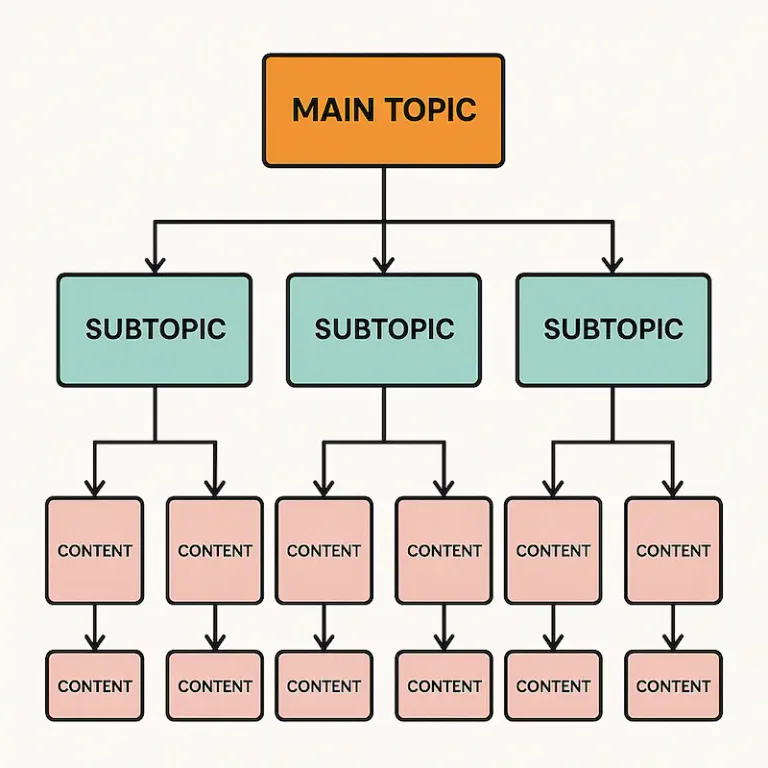
In SEO, content silos group related pages under thematic umbrellas, boosting topical authority and signaling clear relevance to search engines. Start by clustering keywords into core topics and subtopics. For each cluster, create a “pillar” page covering the broad theme and multiple “cluster” pages that dive deep into specific long-tail phrases. Link intelligently: cluster pages should link back to the pillar, and vice versa, forming a tight-knit web of context. This architecture not only improves crawl efficiency but also enhances user navigation.
Creating an implementation structure of website in excell
To translate your keyword research into an Excel-based roadmap where each topic corresponds to a subpage, follow these steps:
- Set up your worksheet:
- In column A list each main topic as its own row (for example, “SEO”).
- Indent each subtopic (keyword cluster) on its own row below the main topic (for example, “Linkbuilding,” “On-Site SEO,” “Content drafting”).
- Add key columns:
- Column B – URL or page (e.g., /seo/linkbuilding/)
- Column C – Primary keyword
- Column D – Page type (pillar, cluster, FAQ, product)
- Column E – Tasks (e.g., internal linking; meta-title update; outreach)
- Column F – Owner
- Column G – Deadline
- Column H – Status (Not Started, In Progress, Complete)
- Populate with research data:
- For each keyword cluster, enter an existing URL or draft a new slug.
- Fill in the primary keyword and list required SEO tasks in the tasks column.
- Use visual cues:
- Apply conditional formatting to the Status column (red for overdue, orange for due soon, green for completed).
- Bold main-topic rows to distinguish them from subtopics
This approach makes each researched keyword a clear page plan.
Visualizing site structure with draw.io
Before implementing silos, map your proposed architecture visually. Using a tool like draw.io, draft a diagram illustrating home → pillar → cluster relationships, internal linking pathways, and key landing pages. Color-code sections for different content types (blogs, product pages, FAQs) and annotate where primary and secondary keywords will live. This visual blueprint helps stakeholders grasp the SEO blueprint quickly and ensures development and design teams build the correct hierarchy.
Aligning website structure to keyword insights
Much like the economic principle of supply and demand, your site structure must adapt to market signals. High-demand, low-competition keywords demand prime real estate top-level navigation, hero sections, or featured blocks. Mid-demand topics may sit deeper within silos but still receive contextual links. Low-volume, hyper-specific phrases can live in FAQs or blog series. By matching your wensite’s hierarchy and link equity to keyword opportunity “supply,” you ensure every term gets the right exposure, maximizing your SEO ROI.


